
Never worry about a dead battery again: rent a power bank, return it anywhere.
ChargeGhar is Nepal's power bank sharing network. Users find a nearby station on the map, scan to rent a power bank, pay from their wallet and return it at any station. We built the rental app and the systems behind it, so that keeping a phone alive feels effortless.
- Industry
- Mobile charging and utilities
- Platforms
- iOS, Android, Web
- Market
- Nepal
Why ChargeGhar
What the product gets right
Stations everywhere you go
Cafes, malls, airports and other busy places host stations, so a charge is usually close by.
Scan and go
Renting takes a QR scan and a tap, which suits someone whose phone is almost out of battery.
Return anywhere
A power bank can be returned to any station in the network, not just the one it came from.
Pay for what you use
Transparent pricing with no hidden fees, subscriptions or lock-in contracts.
A wallet that keeps it simple
Users pay from a wallet inside the app, so every rental starts with one tap.
Live rental view
Time, package and cost are shown on screen so the user always knows where they stand.
Good for the planet
Sharing power banks reduces the number of devices made and the electronic waste they create.
Built for a growing network
New stations, locations and packages can be added as the network expands across Nepal.
Overview
The ChargeGhar story
Anyone who has watched their phone fall to one percent in the middle of a day knows the feeling the ChargeGhar team calls low battery anxiety. The company's mission is to remove it, by building a power bank sharing network across Nepal. Instead of every person carrying their own charger, shared power banks sit in stations at places people already go, and can be rented for as long as they are needed.
The product is simple to describe and demanding to build. A user opens the app, sees stations on a map, walks to one, scans a code and takes a power bank. They use it, then return it to any station in the network and the rental ends. Behind that simplicity sit stations that must report their state, power banks that must be tracked, a wallet that must stay accurate and an operations team that must keep the network healthy.
We worked on ChargeGhar as a complete system. The user app handles discovery, renting, payment and rental tracking. The tooling behind it lets the team manage stations, power banks and pricing. And the shared logic ties the physical hardware to the digital experience, so that what a user sees on their screen always matches what is happening at the station.
The business case rests on three ideas the company describes clearly: convenience, because a station is always within reach; portability, because a power bank can be returned anywhere; and affordability, because users pay only for what they use, with no subscriptions or hidden fees. We treated those three promises as the design brief and judged every feature against them.
One thing that stands out about this kind of product is how it depends on trust in both directions. Users trust the network to have a charged power bank waiting, and the business trusts users to return it. The app is the place where that mutual trust is made visible, through honest availability, clear pricing and a clean record of every rental. Designing for trust in both directions shaped much of the product.
The mobile experience
A complete journey, screen by screen
Finding the nearest charge
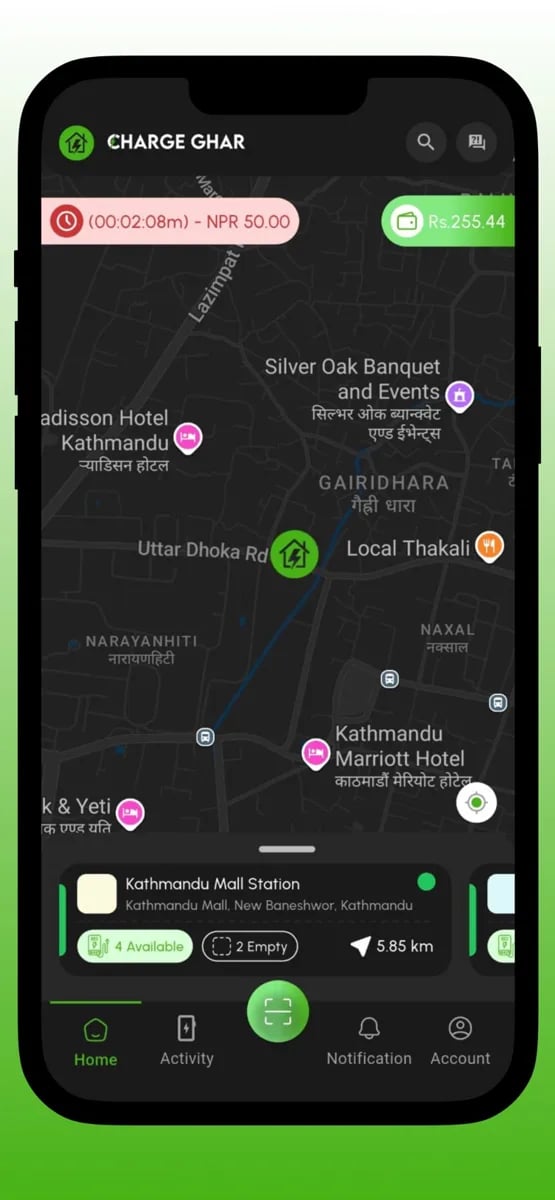
The home screen is a map of stations around the user, with markers that show where charge is available. Each station shows its name, the distance and how many power banks are ready, so a user can choose the nearest useful option at a glance. The design assumes someone in a hurry.
A running rental, if there is one, stays visible at the top of the screen with its timer and cost. A user who has already rented does not have to hunt for the information they care about most.
The map is designed for the real conditions of use: sunlight, small screens and one-handed taps. Controls are large, the labels are readable and the most important action is always obvious.
- Map of nearby stations
- Availability at a glance
- Distance to each station
- Running rental always visible
What is available at this station
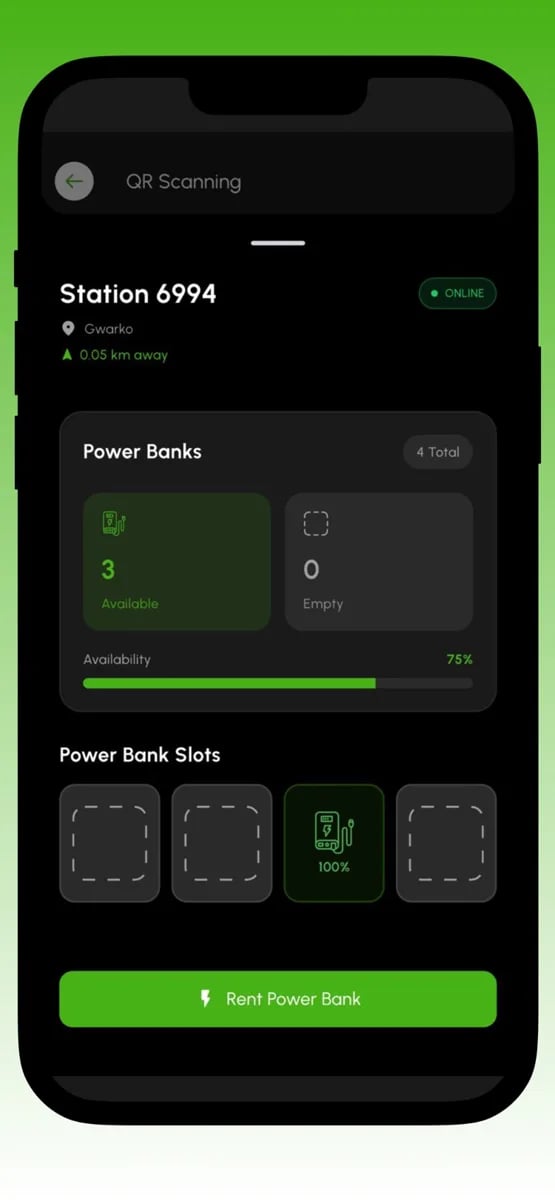
Selecting a station opens its details: how many power banks are available, how many slots are empty and whether the station is online. The slot view shows the physical layout, so the user can understand what they will see when they get there.
For a service where return is as important as rental, empty slots matter as much as full ones. A user planning to return a power bank at a particular station can see whether there is room.
Presenting this information clearly also builds trust. When the app is honest about availability, users learn that it can be relied upon, which is critical for a service people use in moments of need.
- Available power banks
- Empty slots for returns
- Online status
- Physical slot view
Scan, confirm, take
Renting starts with a QR scan. The scanner opens quickly, recognises the code and takes the user straight to the station and the power bank. The flow avoids unnecessary steps, because every second matters when a battery is dying.
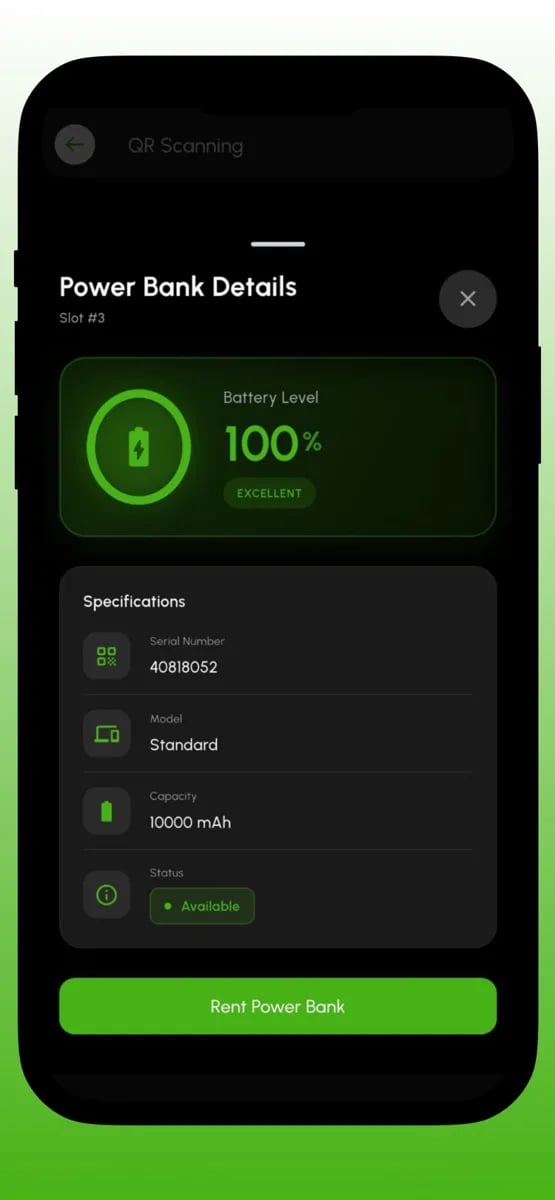
The power bank details screen shows the essentials: the charge level, the capacity and the status. A single confirm button starts the rental, and the user is told clearly what the package and the pricing are before they commit.
Once confirmed, the station releases the power bank and the app switches to the rental view. The moment between confirm and release is designed to feel responsive and clear, so users are never left wondering whether it worked.
- Quick QR scanner
- Charge level and capacity shown
- Clear package and price
- Instant start of the rental
Paying from a wallet
Rentals are paid from a wallet inside the app. The wallet shows the balance, makes it easy to add money and records each transaction, so users can see exactly what they have spent and why.
Using a wallet keeps each rental fast. There is no card form at the moment of need, just a tap, which suits a product used in a hurry. It also gives the business a simple way to offer top-up options and incentives.
Clarity is the priority. The pricing package is shown before a rental, the cost runs visibly during the rental and the final amount is recorded in the history, so there are no surprises.
- Wallet balance and top-up
- Transaction history
- Package pricing shown first
- No surprise charges
Tracking an active rental
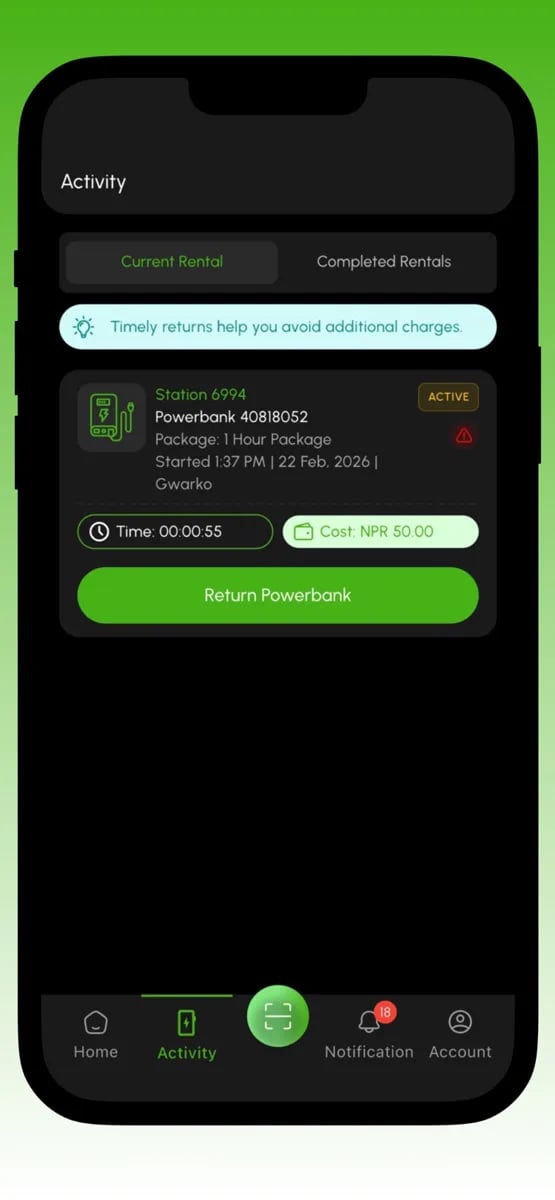
The activity screen keeps the user informed during a rental. It shows the current rental with the station, the power bank, the package and the time elapsed, along with the cost so far. A prominent return button is always available.
The screen also reassures with timely guidance, such as reminding users to return before extra charges apply. Helping people avoid unnecessary cost is good for trust, and trust is what turns a first rental into a habit.
Completed rentals are listed in a separate tab, so users have a clear record of their past usage and spending.
- Live time and cost
- Package details
- Return button
- Completed rentals list
Returning anywhere in the network
Returning a power bank is as simple as taking one. The user goes to any station with an empty slot, inserts the power bank and the rental ends. The app confirms the return and shows the final summary.
The ability to return anywhere is central to the promise of portability. It removes the pressure to go back to a specific place and fits naturally into the way people move around a city.
Because returns affect the balance of the network, the system tracks where power banks end up, which helps the team keep stations stocked and ready for the next person.
- Return at any station
- Automatic end of rental
- Final summary
- Network balance tracking
Keeping the network healthy
Behind the app, the ChargeGhar team uses tooling to run the network. They can see stations, power banks and rentals, and monitor which locations are busy, which are low on stock and which need attention.
Pricing and packages are configurable, so the team can adjust offers as they learn what customers prefer, without waiting for a new release of the app.
As the network grows with new partner locations such as cafes, malls and airports, the same tooling scales to manage them. That ability to expand smoothly is essential for a business whose value grows with every new station.
- Station and power bank overview
- Rental monitoring
- Configurable packages
- Partner location management
Engineering
The decisions behind the build
Hardware and app in sync
Stations report their state to the platform, so the app always reflects which power banks are available and which slots are free.
A rental state machine
Every rental moves through clear states, from started to active to returned. That keeps billing accurate and makes problems easy to trace.
Reliable QR flow
The scanning flow is tuned for quick recognition and for graceful recovery if the code cannot be read or the station is offline.
A ledger-style wallet
Wallet balances are recorded as transactions, so every charge and top-up can be traced, which matters for trust and for support.
Real-time updates
Station availability and rental status update in real time, so users do not rely on stale information.
Configurable pricing
Packages and prices live in configuration, allowing the team to adjust offers without a new release.
Scope
What a product like this covers
- 01
- Station mapNearby stations with distance and availability.
- 02
- Station detailsAvailable power banks, empty slots and online status.
- 03
- QR scan to rentA fast scanner that starts a rental in a few taps.
- 04
- Power bank informationCharge level, capacity and status before renting.
- 05
- WalletBalance, top-up and a record of transactions.
- 06
- Rental packagesClear packages and pricing shown before a rental starts.
- 07
- Live rental viewElapsed time and running cost during a rental.
- 08
- Return anywhereReturns at any station with automatic rental completion.
- 09
- Rental historyCompleted rentals and spending in one place.
- 10
- NotificationsReminders and updates about rentals and returns.
- 11
- Station and stock managementTools for the team to monitor stations and power banks.
- 12
- Admin and reportingPricing configuration and insight into usage across the network.
The challenge
What had to be solved
The first challenge was the link between hardware and software. A rental app is not just screens. It depends on physical stations that know which power banks they hold, whether those banks are charged and whether a rental has begun or ended. The app had to present that physical reality accurately and in real time, and cope gracefully when a station is offline.
The second challenge was speed under stress. People rent a power bank because their battery is nearly empty, which means they have little time and little patience. The path from opening the app to holding a charged power bank had to be as short as possible, with a map that loads quickly, a scanner that works first time and a clear confirmation.
The third challenge was money. A rental service charges by time or package, and users need to trust that the charges are correct. The wallet, the pricing packages, the running cost and the final total all had to be consistent, visible and fair, because a surprise on a bill ends a customer relationship quickly.
The fourth challenge was network health. A shared network only works if power banks are returned and stations are balanced. Too many empty stations in one area, or too few free slots in another, makes the service frustrating. The product and its tooling needed to show the team where the network was healthy and where it needed attention.
Project goals
- Show nearby stations on a map with their availability.
- Let users rent with a quick QR scan and a clear confirmation.
- Keep a wallet and show the cost of a rental as it runs.
- Allow returns at any station in the network.
- Give the team tools to monitor stations, power banks and pricing.
- Support a growing network of locations and partners.
Design principles
The rules we designed by
Design for low battery
The people using this app have little power and little time. We designed every screen for speed, with large controls, minimal steps and nothing that needs thought, because the user is already stressed.
Make availability honest
A map that promises a power bank that is not there is worse than no map. We invested in accurate, real-time availability so users learn that the app tells the truth.
Price without surprises
The package, the running cost and the final total are visible at every stage. Users who understand what they will pay are willing to pay it.
Make returning easy
Return is half of the experience. We designed it to be as simple as renting, and to be possible anywhere, because friction at return is what makes people stop using a rental service.
Think in networks
Value comes from the whole network of stations. We designed the system so that adding a new station adds value everywhere, and so that the team can see and balance the network as it grows.
Serve a mission
The company's purpose is a Nepal where no one worries about a dead battery. That clarity made decisions easier: if a feature did not help people stay charged, it did not belong.
Who uses it
Built for every side of the product
Users
People who need power on the move. They want a quick rental, a fair price and an easy return.
Station partners
Cafes, malls, airports and other businesses that host stations. They benefit from foot traffic and a service their customers value.
Operations team
The people who keep the network stocked and healthy. They need visibility of stations, power banks and rentals.
Business owners
The founders growing the network. They need pricing control and insight into usage to decide where to expand.
Process
From brief to live release
- 01
Understand the network
We learn how stations, power banks and partner locations work, so the software matches the physical operation.
- 02
Design the rental journey
We prototype the map, scan, rental and return flows, and test them on real phones with people who need to move quickly.
- 03
Connect the hardware
We build the link between stations and the platform first, with a rental state machine and a reliable wallet.
- 04
Build the apps and tooling
The user app and the operations tools are built in short sprints, with working builds to try at stations.
- 05
Test in the field
We test at real stations, with real power banks, in real conditions, because rentals fail in the field in ways that offices never reveal.
- 06
Launch and expand
We support the launch, watch early rentals closely and help the network add new locations as it grows.
Screens
ChargeGhar app screenshots
Quality and trust
How we keep it reliable
Field testing at stations
We test the whole rental, from scan to return, at physical stations, including offline stations and unreadable codes.
Billing accuracy
Rental time, packages and wallet balances are verified so that every charge is correct and explainable.
Real-time reliability
Availability and rental status are tested under changing network conditions so the app stays trustworthy.
Security of payments and data
Wallet and personal data are protected and handled carefully.
Performance
The map and scanner are tuned to load quickly on ordinary phones, even in weak coverage.
Monitoring
Station health, failed rentals and errors are tracked so that issues are found and fixed quickly.
“This was not an easy project. App plus hardware stations plus payments, and so many things can go wrong. There were tough weeks, I won't lie. But the team stayed with it, and now I see people renting power banks at cafés and it feels unreal.”
Saroj Mahara
Founder, ChargeGhar
Looking back
What this project taught us
ChargeGhar is a good example of a product where software meets the physical world. The experience feels simple because a lot of careful engineering sits behind it, connecting stations, power banks, a wallet and a map into one smooth flow. When that connection is right, a user simply gets charge when they need it.
It also shows the value of a clear mission. A Nepal where no one worries about a dead battery is an easy promise to understand, and it gave us a reliable way to judge decisions. Features that made renting faster, fairer or more available belonged. Features that did not were left out.
If you are planning a product that combines hardware with an app, such as rentals, vending, lockers or sharing services, we would be glad to talk through how to shape the user journey and the systems that keep the physical and digital sides in step.
Finally, the sustainability angle is more than a slogan. A shared model that reduces the number of power banks people need to buy has a real effect on electronic waste. Building technology that helps people and the environment at once is the kind of work we find most worthwhile.
About the ChargeGhar project
Straight answers about how a product like this is planned, built and launched.
Still exploring? Let us help.
A small senior team, a developer assigned within 48 hours, and source code that is yours on full payment.
“Simple. Fast. My customers don't want to think, they want momo at midnight. The app does that.”
You can also write to us at hello@inflancer.com and our team will get back to you right away.
More case studies
Caller ID App
Callexa
Callexa is a communication platform that makes calls more meaningful, organised and transparent. Callers add a reason, recipients see it before they pick up, and calling, chatting, sharing and community support live together in one app.
Ride Sharing App
Yatra
Yatra is a ride-sharing app for bikes, cars and parcels. Riders set a pickup and drop-off, choose a ride and a fare, and follow their driver live on the map. Behind it sits the driver app and the operations tooling that keep a marketplace of trips running.
Flight Booking App
Damiticket
Damiticket is a flight booking platform for Nepal. Travellers search domestic flights, compare fares and classes across airlines and book in a few taps. We designed the search, comparison and booking journey so that choosing a flight feels as simple as it should.