A whole supermarket in one app
Fresh produce, groceries and household items are organised into categories that are easy to browse.


Bhaansa is a trusted online grocery and supermarket platform serving customers across Nepal. We built the customer app and the delivery app so that fresh produce and daily essentials can be ordered in a few taps, paid for with cash on delivery or Khalti, and tracked to the door.
Overview
Buying groceries is one of the most repeated tasks in a household, which makes it a perfect candidate for a good app. Bhaansa is an online grocery and supermarket platform built for customers in Nepal. Its mission is to provide high-quality groceries, fresh produce and daily essentials with convenience and reliability, at competitive prices and with timely delivery.
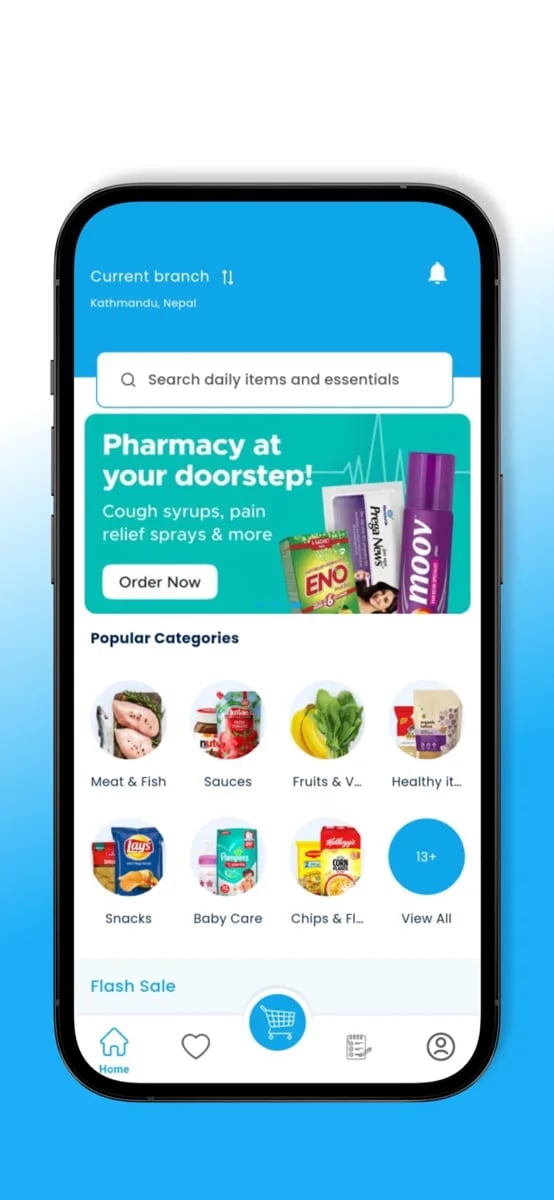
The shopping experience follows the way families actually buy. The home screen offers search and clear categories such as meat and fish, fruit and vegetables, snacks and baby care. Promotions such as flash sales are visible without getting in the way. Product pages show what a customer needs to decide, and the cart brings everything together with the delivery option and, for regular purchases, a subscription plan.
Behind the customer app is a second app for the people who bring the groceries to the door. The Bhaansa Delivery app is reserved for authorised delivery partners. It notifies them of new orders, shows customer details and delivery locations with map support, and lets them update the status of each delivery in real time. Together, the two apps make up one connected system.
We worked on the complete product, from the shopping flows and payment options to the delivery tooling and the operations behind them. Grocery commerce is demanding because customers order often, carts are large and expectations about freshness and timing are high. That meant paying particular attention to speed, clarity and reliability, and to the details of cash and digital payments.
The founder's account of the project captures where the hard conversations were. Payments, refunds and what happens when a rider cannot find a house are not glamorous topics, but they decide whether a delivery service works. We spent time on exactly those questions, and the platform is better for it.
Why Bhaansa
The mobile experience
The home screen works like the front of a good supermarket. A search bar sits at the top, categories are laid out as large, recognisable icons and promotions such as flash sales and a pharmacy banner draw attention without overwhelming the page. A customer can start shopping from here in a single tap.
Categories are chosen for the way families think: meat and fish, sauces, fruit and vegetables, healthy foods, snacks, baby care and more. Each category leads to a clean list of products, with filters that help narrow a long catalogue quickly.
Because customers visit often, the home screen also remembers what matters to them, surfacing frequent items and offers so that repeat shopping becomes faster each time.
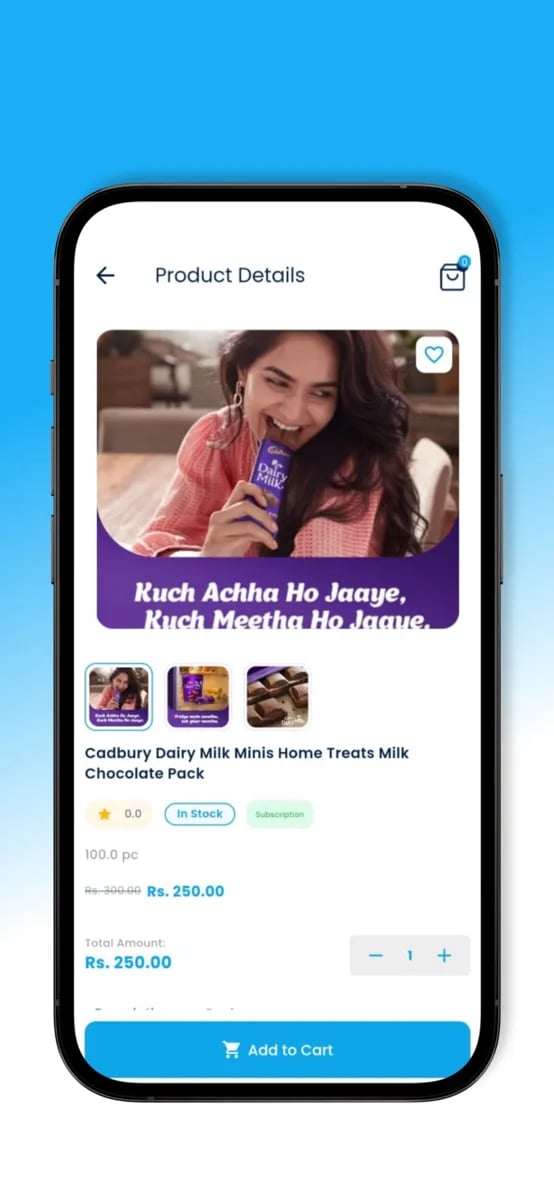
A product page shows what a customer needs: a clear image, the name and size, the price, any discount and the availability. A quantity control and a single add-to-cart button make it easy to buy without leaving the page.
For products with different sizes or variants, the choice is presented clearly so the customer selects correctly the first time. Accurate information reduces wrong orders, which in turn reduces returns and refunds.
Related products and offers are suggested in a way that is useful rather than pushy, which helps customers complete a basket without having to search for each item.
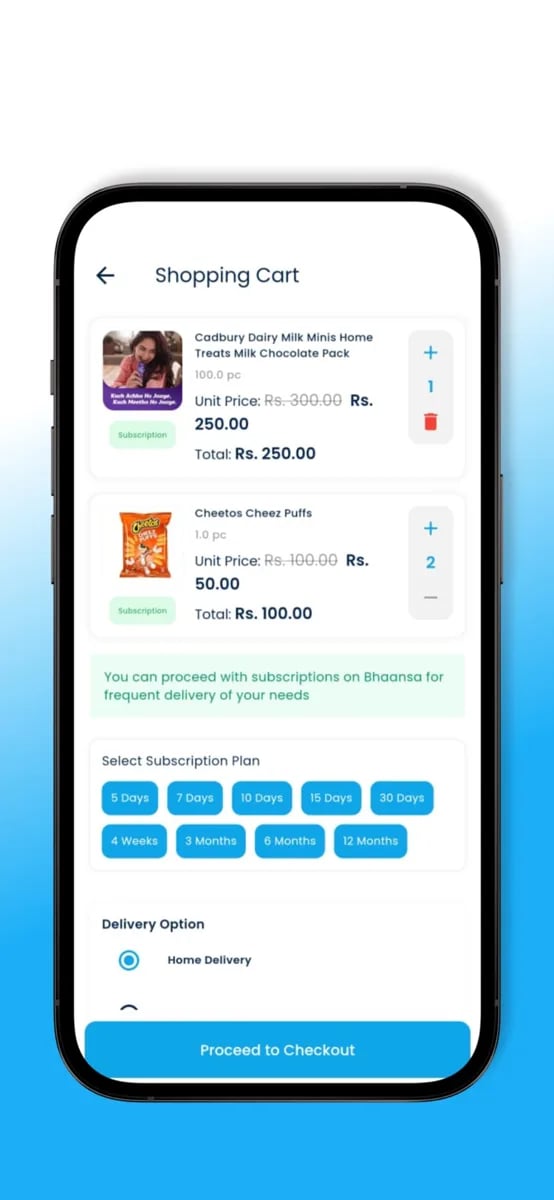
The cart shows each item with its price, quantity and total, and makes changes quick. Customers can remove items, adjust amounts and see the running total update immediately, which matters when a family is working within a budget.
Below the items, the customer chooses how they want to receive the order. A delivery option is shown clearly alongside the cost, so that nothing about the total is a surprise at checkout.
The cart is also where a regular shopper can turn a one-off order into a routine, which leads to the subscription option described next.
Households buy milk, rice and cooking essentials again and again. Bhaansa lets customers set a subscription plan for items they need regularly, choosing how often they want delivery, so that the app takes over the work of remembering.
For customers, this removes the effort of reordering. For the business, it creates predictable demand and a stronger relationship with the household.
The subscription choice is presented in plain language within the cart, so that customers understand exactly what they are signing up for and can change or stop it whenever they like.
Payment is where trust is decided. Bhaansa accepts cash on delivery and the Khalti payment gateway, which together cover the preferences of most households. The customer chooses at checkout and always sees the total they will pay.
For cash orders, the delivery app records collection, which keeps the accounts accurate. For digital payments, the platform confirms the payment before the order is processed. Both paths end with a clear record that supports the team and the customer.
Refunds and failed payments are handled with the same care. The conversations about these edge cases were some of the most important in the project, because they determine how the service feels when something goes wrong.
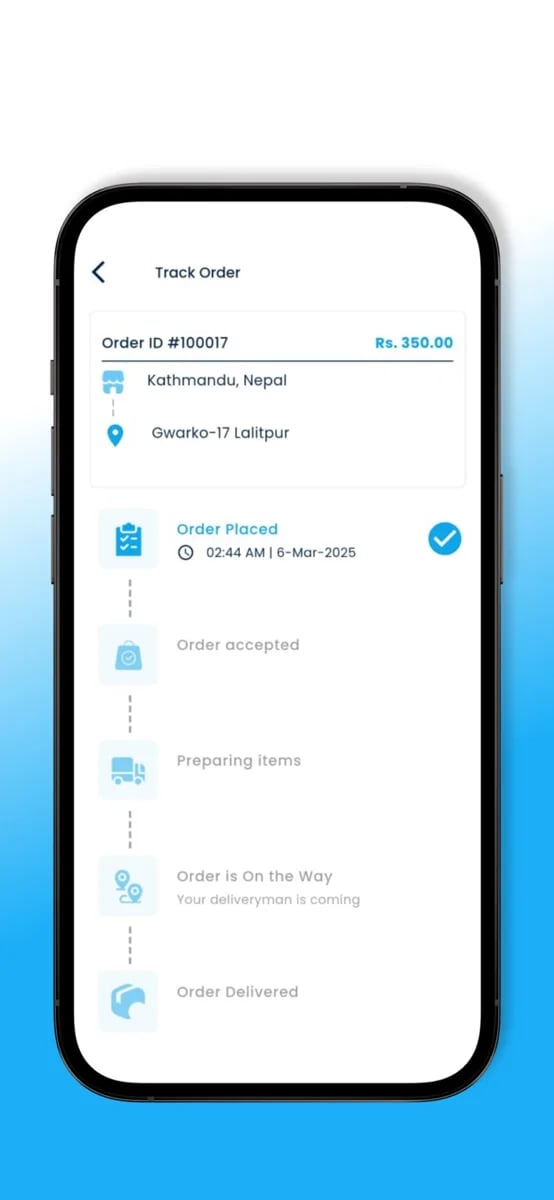
After checkout, the order tracking screen shows the order progressing through its stages: placed, accepted, preparing, on the way and delivered. Each stage is marked as it happens, with the time recorded, so the customer always knows where things stand.
The delivery address and order number remain visible, and the customer can see when the rider is nearby. This visibility reduces the number of anxious calls to the team and improves the sense of reliability.
If a delay or change occurs, the app communicates clearly. Honest updates are valued more than silence, and they help the customer plan their day around the delivery.
The Bhaansa Delivery app is for authorised delivery partners only. When a new order is assigned, they are notified immediately and can see the customer's details and delivery location. The key information is on one screen, so they can act quickly.
Map support helps riders reach the address, and simple status actions move the order through accepted, picked up and delivered. Each action updates the customer's tracking screen, keeping everyone in step without extra effort.
The app is built to be easy to use for people on the road. Large controls, clear text and reliable notifications make it dependable in real working conditions.
A grocery platform needs a back office as capable as its front end. The team manages the catalogue, updating products, prices and stock, so the app always shows what can actually be delivered. Changes appear immediately, which keeps customers from ordering items that are not available.
Orders arrive in a clear queue where they can be followed from placement to delivery. When something needs attention, such as a stalled order or an unreachable address, the team sees it quickly and can step in.
Reporting gives the owners a view of how the business is doing: what sells, when customers order and how deliveries perform. That insight turns day-to-day activity into decisions about stock, offers and growth.
Scope
Fast search and clear category browsing across a large catalogue.
Promotions that are visible without crowding the page.
Images, prices, discounts, variants and stock information.
Quantity changes, running totals and delivery options.
Regular delivery of items bought on a schedule.
Collection recorded by the delivery partner.
Digital payment with confirmation before processing.
Timeline of stages from placed to delivered.
Past orders and quick reordering of common items.
Order alerts, map support and status updates for partners.
Tools to add and update products, prices and stock.
Overview of orders, deliveries and performance.
The challenge
The first challenge was catalogue scale. A supermarket has thousands of products, each with its own price, size, category and stock. Customers need to find what they want quickly, and the team needs to keep the catalogue accurate. The app needed good structure, fast search and a product page that is clear without being cluttered.
The second challenge was payments. Many households in Nepal prefer cash on delivery, while others use digital wallets such as Khalti. Supporting both means handling collection of cash by riders, confirmation of digital payments and clear records for each order. It also means thinking carefully about refunds and failed payments.
The third challenge was delivery. A grocery order is time-sensitive, often contains perishable items and must reach the right house. Riders need accurate customer details, helpful maps and an easy way to communicate status. The system had to cope with the realities of addresses and landmarks, and with deliveries that do not go to plan.
The fourth challenge was repeat shopping. Most grocery orders are repeats of earlier ones. The experience had to reward regular customers, with quick reordering and subscription options for the items they buy on a schedule, so the app becomes part of a household routine rather than a one-off purchase.
The fifth challenge was consistency between the shelf and the screen. If the app promises an item that is out of stock, the customer is disappointed and the team has to apologise or issue a refund. Keeping the digital catalogue in step with reality, with fast updates and clear handling of substitutions, was a continuing focus throughout the design.
Who uses it
Households ordering groceries and daily essentials. They want clear browsing, fair prices and dependable, timely delivery.
Authorised riders who bring orders to the door. They need clear instructions, map support and simple status actions.
The people who keep products, stock and orders accurate. They need tools to manage the catalogue and follow each order.
The founders growing the platform. They need insight into orders, payments and delivery performance.
Engineering
Products, categories, variants and stock are modelled carefully so that search, filtering and ordering stay fast as the catalogue grows.
Cash on delivery and Khalti payments each have their own path, converging on one consistent order and accounting record.
Orders move through defined stages shared by the customer app, the delivery app and the admin tools, so every view stays in sync.
Subscription plans generate orders on schedule, reusing the normal order flow so that delivery and payment work the same way.
New orders and status changes reach delivery partners and customers quickly, which keeps deliveries on time.
Management tools are built alongside the apps so that the team can run the business from day one.
Design principles
Grocery shopping is a routine, and routines should be fast. We designed for repeat use: quick reordering, remembered preferences and subscriptions, so that the tenth order is faster than the first.
Households pay in different ways, and none of them is wrong. Supporting cash and Khalti equally, with clear records for both, makes the platform welcome to more people.
Customers trust a grocery service with food, so timing and quality matter. We built tracking, notifications and delivery tooling around keeping that promise.
Items run out and deliveries run late. We designed clear messages and sensible recovery paths for those moments, because honesty builds more loyalty than a flawless surface.
A supermarket has thousands of products, so the interface must stay calm. Clear categories, generous spacing and consistent product pages make a huge catalogue feel manageable.
The customer app and the delivery app are two halves of one experience. We designed them together so that every action in one is visible in the other.
Process
We learn how families buy groceries, how they pay and what goes wrong, so the app fits real habits.
We prototype browsing, cart, subscription and checkout flows, and test them with real shoppers.
We set up the product catalogue, the order lifecycle and the payment paths first, as the rest depends on them.
The customer and delivery apps are built in short sprints with working builds to review each time.
We test orders end to end, including cash collection, refunds and addresses that are hard to find.
We support the launch and use real orders to refine search, categories and delivery details.
Screens
Quality and trust
We test the full journey from cart to delivery, including cancellations and changes.
Both cash and Khalti paths are tested for accuracy, including failures and retries.
Prices, discounts and stock are validated so customers see correct information.
Notifications and status updates are tested across devices and networks, to keep deliveries on time.
Customer details are used only to complete an order and shown only to those who need them.
After launch, errors and stuck orders are tracked so that they are resolved quickly.
“We had a lot of back and forth on payments. Khalti, cash on delivery, refunds, what happens when the rider can't find the house. The team never got annoyed with my questions. Delivery mistakes are much fewer now, and my staff is less stressed.”
Surendra Chaudhary
Owner, Bhaansa
Looking back
Bhaansa is a good reminder that e-commerce is a service business first and a software business second. The app is the visible part, but the quality of the groceries and the reliability of delivery are what customers remember. Our job was to make the software disappear into a smooth experience, and to give the team tools that keep that experience consistent.
It also showed how much the conversations about edge cases matter. Payment methods, refunds and hard-to-find houses might sound like details, but they decide whether a customer returns. We were glad to have a client who raised those questions early and kept asking them, because the product is stronger for it.
If you are planning a grocery, retail or delivery platform, we would be happy to talk through how to shape the customer experience, the payments and the delivery side so that they work together from the first order.
A final note is on growth. A catalogue, a set of customers and a team of delivery partners all grow at different speeds. We built the platform so that each can expand without forcing a rebuild of the others, which is what lets a local grocery business become a regional one.
Straight answers about how a product like this is planned, built and launched.
A small senior team, a developer assigned within 48 hours, and source code that is yours on full payment.
“Simple. Fast. My customers don't want to think, they want momo at midnight. The app does that.”
You can also write to us at hello@inflancer.com and our team will get back to you right away.
Caller ID App
Callexa is a communication platform that makes calls more meaningful, organised and transparent. Callers add a reason, recipients see it before they pick up, and calling, chatting, sharing and community support live together in one app.
Ride Sharing App
Yatra is a ride-sharing app for bikes, cars and parcels. Riders set a pickup and drop-off, choose a ride and a fare, and follow their driver live on the map. Behind it sits the driver app and the operations tooling that keep a marketplace of trips running.
Flight Booking App
Damiticket is a flight booking platform for Nepal. Travellers search domestic flights, compare fares and classes across airlines and book in a few taps. We designed the search, comparison and booking journey so that choosing a flight feels as simple as it should.