Node.js backend development involves building server-side applications using JavaScript to manage business logic, APIs, databases, authentication, and communication between systems. It helps businesses develop web and mobile applications that handle multiple simultaneous requests without creating a separate thread for every connection.
From real-time messaging platforms to enterprise applications, Node.js supports different backend requirements through its event-driven architecture and extensive development ecosystem.
This guide explains how Node.js works, its benefits, frameworks, architecture, development process, costs, and best practices for building reliable backend systems.
In a Nutshell
- Node.js backend development uses JavaScript to build server-side applications that manage APIs, databases, authentication, and business logic.
- Key consideration: Evaluate application workload, particularly whether it involves frequent asynchronous I/O or CPU-intensive processing, before selecting Node.js.
- An illustrative Node.js backend development project requiring 400 hours at $40 per hour would cost $16,000, excluding testing, infrastructure, and maintenance.
- Running CPU-intensive synchronous operations on the main event loop is a common mistake that can delay other requests and affect application responsiveness.
- Inflancer delivers custom Node.js backend development and API integration services connecting web and mobile applications with essential business systems.
What is Node.js Backend Development?
Node.js backend development is the process of creating server-side applications using Node.js, an open-source JavaScript runtime built on Google’s V8 JavaScript engine. It allows developers to execute JavaScript outside the browser and build the systems that power web applications, mobile applications, and APIs.
A backend developed with Node.js handles operations that users typically cannot see, including:
- Processing incoming application requests.
- Managing user authentication and permissions.
- Connecting applications with databases.
- Executing business rules and calculations.
- Managing file uploads and downloads.
- Processing payments through integrated services.
- Sending notifications and handling background jobs.
- Exchanging information with third-party applications.
For example, when a customer places an order through an eCommerce application, the Node.js backend can validate the request, retrieve product information, check inventory, create an order, and initiate payment processing.
The frontend displays the information, while the backend manages the underlying operations.
One important advantage is that developers can use JavaScript across both frontend and backend development, reducing the need to maintain entirely separate programming-language ecosystems.
According to the official Node.js documentation, the runtime provides built-in capabilities for HTTP communication, file handling, asynchronous operations, testing, and application diagnostics.
How Does Node.js Backend Development Work?
Node.js backend development works through an event-driven, non-blocking I/O model. Instead of waiting for every database query, network request, or file operation to finish before handling other work, Node.js coordinates asynchronous operations through its event loop.
This architecture makes Node.js particularly relevant for applications that regularly communicate with databases, APIs, external services, and connected users.
Understanding the Event Loop
The event loop coordinates JavaScript execution and asynchronous operations.
Consider an application receiving multiple requests simultaneously.
- A user sends a request to the server.
- Node.js receives the request and executes the relevant application code.
- An asynchronous operation, such as a database query, is initiated.
- The event loop can continue handling other work while the operation is pending.
- Once the operation completes, its callback or promise continuation is scheduled.
- The application processes the result and sends a response.
This approach allows a Node.js application to coordinate multiple connections without assigning a dedicated JavaScript execution thread to every client.
However, Node.js is not entirely single-threaded. It also uses operating-system facilities and a worker pool for certain operations.
Non-Blocking Operations
Non-blocking I/O allows applications to continue processing other work while waiting for supported operations to complete.
For instance, a food delivery application may need to retrieve restaurant information, check delivery availability, and communicate with a payment provider.
Node.js can coordinate these operations asynchronously instead of forcing the application to wait for every independent operation sequentially.
Handling CPU-Intensive Tasks
CPU-intensive operations require additional consideration.
Large calculations, complex image processing, and expensive synchronous operations can block the event loop and delay other requests.
Node.js provides worker threads and other concurrency mechanisms for appropriate workloads. Applications may also delegate intensive processing to dedicated services.
The official Node.js performance guidance specifically recommends avoiding long-running work on both the event loop and worker pool.
Why Use Node.js for Backend Development?
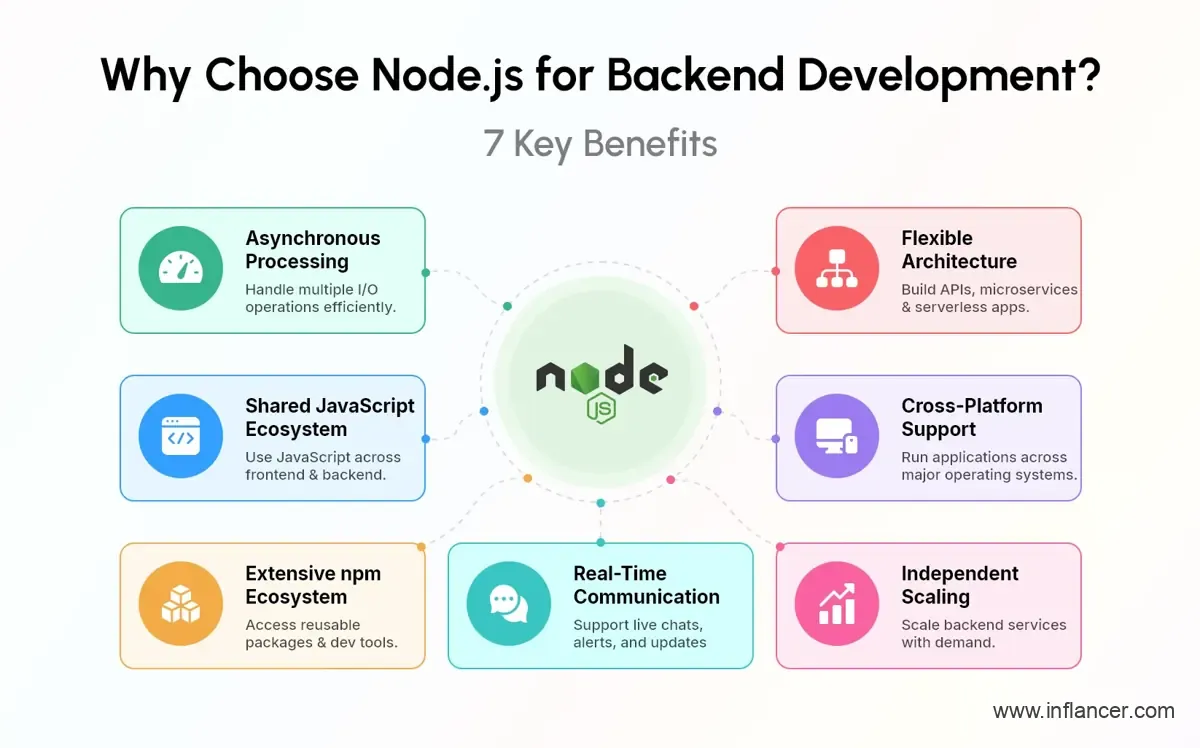
Node.js offers several advantages for businesses building API-driven, real-time, and scalable web applications. Its asynchronous execution model, JavaScript ecosystem, and framework options make it suitable for projects ranging from focused digital products to complex enterprise platforms.
The actual benefits depend on application architecture, workload characteristics, development quality, and infrastructure.
1. Asynchronous Request Handling
Node.js can coordinate numerous concurrent I/O operations without requiring a separate application thread for every connection.
This makes it useful for applications involving frequent database queries, API communication, and network requests.
2. Shared JavaScript Ecosystem
Frontend and backend teams can work with JavaScript or TypeScript.
This creates opportunities to share validation rules, data types, utilities, and development practices across application layers.
However, using one language does not automatically eliminate integration complexity.
3. Extensive Package Ecosystem
The npm ecosystem provides packages for authentication, database access, validation, logging, testing, and third-party integrations.
Developers can use established packages instead of building every supporting function from scratch.
Dependencies still require security reviews and regular maintenance.
4. Real-Time Communication
Node.js can support persistent connections and event-driven communication through technologies such as WebSockets.
Typical applications include messaging, live notifications, collaborative platforms, and operational dashboards.
5. Flexible Application Architecture
Node.js supports multiple architectural approaches, including:
- Monolithic applications.
- Modular monoliths.
- Microservices.
- Serverless functions.
- API gateways.
- Event-driven systems.
The appropriate architecture depends on application complexity, deployment requirements, and team capabilities.
6. Cross-Platform Development
Node.js applications can run on supported Windows, Linux, and macOS environments.
This provides flexibility when selecting development environments and production infrastructure.
7. Independent Service Scaling
Backend services can be deployed as separate application instances behind load balancers.
Businesses can increase capacity according to actual demand rather than assuming that a single server will support every future requirement.
Scaling still requires suitable database design, caching, monitoring, and infrastructure planning.
What Types of Applications Can Be Built Using Node.js?
Node.js is commonly used to develop applications that require API communication, asynchronous data processing, or real-time interaction. Its flexibility also allows development teams to build conventional business applications with databases, authentication, and complex workflows.
The following examples show how Node.js backend development for web applications supports different business requirements.
| Application Type | Common Backend Requirements |
|---|---|
| eCommerce platforms | Product APIs, carts, orders, inventory, payment integration |
| Real-time chat applications | Messaging, presence tracking, notifications |
| SaaS platforms | Authentication, subscriptions, tenant management |
| Booking applications | Availability, scheduling, reservations, confirmations |
| Financial applications | Transaction workflows, account APIs, audit logging |
| Healthcare applications | Appointments, patient workflows, system integrations |
| Logistics platforms | Shipment tracking, dispatch, status updates |
| Learning platforms | Course management, assessments, progress tracking |
| Enterprise applications | Role-based access, approvals, reporting, integrations |
1. Real-Time Applications
Node.js supports event-driven communication for applications where users need timely updates.
Examples include live chat, customer support systems, collaborative workspaces, and delivery tracking.
2. API-Driven Applications
Node.js can power REST APIs, GraphQL services, and backend-for-frontend systems.
These services connect web interfaces, mobile applications, databases, and external business systems.
3. Enterprise Platforms
Enterprise applications often require multiple user roles, approval processes, audit trails, integrations, and configurable business rules.
Node.js can support these requirements when paired with suitable architecture, security controls, and testing practices.
For businesses planning connected mobile and backend systems, this Enterprise Mobile App Development guide provides additional context.
Which Framework Is Best for Node.js Backend Development?
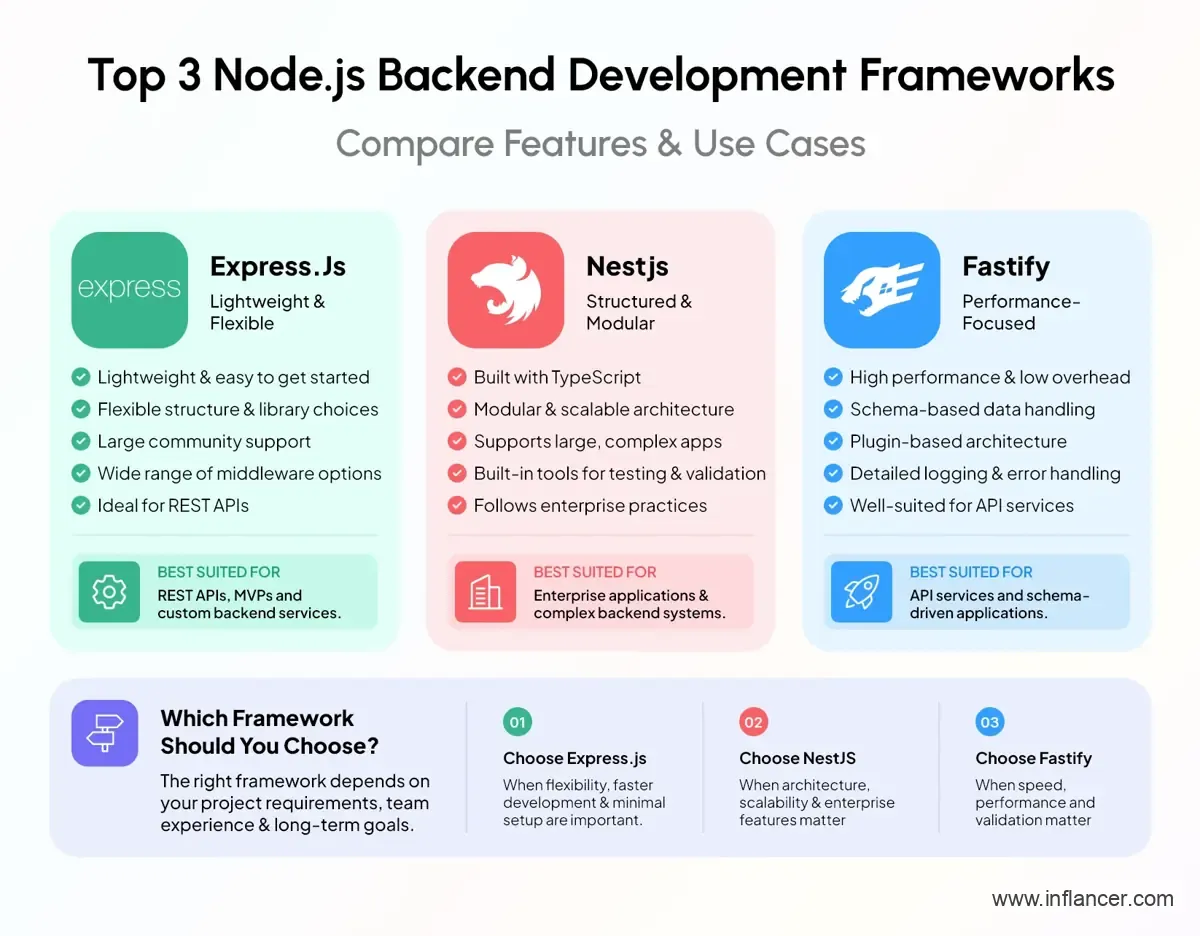
The appropriate Node.js backend development framework depends on application complexity, performance requirements, team experience, and architectural preferences. Express.js provides flexibility, NestJS offers a structured application architecture, and Fastify emphasizes efficient request handling and schema-based validation.
There is no single framework that fits every Node.js project.
1. Express.js
Express.js is a minimal and flexible Node.js web application framework commonly used to develop web applications and APIs.
Its lightweight design allows developers to select their preferred libraries and organize application components according to project requirements.
Common use cases: REST APIs, custom backend services, MVPs, and applications requiring flexible architecture.
2. NestJS
NestJS is a Node.js framework built around a structured, modular development approach. It uses TypeScript by default while supporting JavaScript.
Its architecture encourages separation between controllers, services, modules, and other application components.
Common use cases: Enterprise applications, complex business platforms, modular backend systems, and applications maintained by multiple development teams.
3. Fastify
Fastify is a Node.js web framework designed around performance and developer productivity.
It provides schema-based request validation and response serialization, along with configurable logging and plugin-based extensibility.
Common use cases: API services, applications with defined request schemas, and backend systems where request-processing efficiency is important.
Node.js Framework Comparison
| Framework | Core Approach | Development Consideration |
|---|---|---|
| Express.js | Minimal and flexible | Teams define much of the application structure |
| NestJS | Modular and structured | Provides established architectural conventions |
| Fastify | Schema-driven and performance-focused | Supports integrated validation and serialization |
Framework selection should consider maintainability and the development team’s experience alongside performance benchmarks.
What is Node.js Backend Development Architecture?
Node.js backend development architecture defines how server-side components are organized, how requests move through the system, and how different services communicate. A suitable architecture separates responsibilities, supports maintainability, and provides a foundation for future application growth.
For a typical web application, the backend architecture includes several connected layers.
1. API Layer
The API layer receives requests from frontend applications, mobile applications, and external systems.
It manages routing, request validation, response formatting, and API communication.
For example, an appointment-booking application may expose separate endpoints for retrieving available appointments, creating bookings, and cancelling reservations.
2. Authentication Layer
Authentication verifies user identities, while authorization determines which resources and actions users can access.
An enterprise application may provide different permissions for administrators, managers, employees, and customers.
These controls should be enforced on the backend rather than relying only on frontend restrictions.
3. Business Logic Layer
The business logic layer executes application-specific rules.
In an expense management system, it might validate spending limits, manage approval sequences, and calculate reimbursement amounts.
Separating these operations from API routes makes them easier to maintain and test.
4. Data Access Layer
The data access layer handles communication with databases and other persistent storage systems.
Depending on application requirements, developers may use relational databases, document databases, or a combination of storage technologies.
5. Integration Layer
This layer connects the application with external services, including payment gateways, email providers, customer relationship management systems, and enterprise applications..
Integrations require appropriate authentication, error handling, timeouts, and retry policies.
6. Background Processing Layer
Background processing handles operations that do not need to finish during the original HTTP request.
Examples include generating reports, sending bulk notifications, and processing uploaded documents.
A queue can coordinate these jobs while dedicated workers execute them.
Common Architecture Patterns
| Architecture | Description | Suitable Scenario |
|---|---|---|
| Monolithic | Application components run within one deployable system | Focused applications with shared deployment needs |
| Modular monolith | Business modules remain separated within one deployment | Growing platforms requiring clear internal boundaries |
| Microservices | Independent services communicate through defined interfaces | Complex systems requiring independent service deployment |
| Serverless | Functions execute through managed infrastructure | Event-driven tasks and suitable variable workloads |
| Event-driven | Components communicate through published events | Asynchronous workflows and distributed integrations |
A microservices architecture is not automatically more scalable or maintainable than a modular monolith. It introduces additional operational requirements, including distributed monitoring, service communication, and failure handling.
The decision should follow actual business and technical requirements.
What Tools Are Used for Node.js Backend Development?
Node.js backend development tools support coding, database access, testing, API documentation, deployment, and application monitoring. Selecting compatible tools helps teams maintain consistent workflows across development and production environments.
The following tools represent commonly available options rather than a mandatory technology stack.
| Category | Tools | Purpose |
|---|---|---|
| Runtime | Node.js | Executes backend JavaScript |
| Language | JavaScript, TypeScript | Application development |
| Package management | npm, pnpm, Yarn | Dependency management |
| Frameworks | Express, NestJS, Fastify | API and application development |
| Databases | PostgreSQL, MySQL, MongoDB | Persistent data storage |
| Database access | Prisma, TypeORM, Sequelize | Data access and modeling |
| Caching | Redis | Frequently accessed data and temporary storage |
| API testing | Postman, Insomnia | API request testing |
| Automated testing | node:test, Jest, Vitest | Application testing |
| Containers | Docker | Application packaging |
| CI/CD | GitHub Actions, GitLab CI | Automated delivery workflows |
| Monitoring | OpenTelemetry, Prometheus | Application observability |
Node.js also provides a built-in test runner through its node: test module, allowing developers to create automated tests without requiring a separate test framework for every project.
Choosing the Right Database
Database selection should follow application requirements rather than developer preference alone.
Relational databases such as PostgreSQL and MySQL support structured relationships and transactional workflows.
Document databases such as MongoDB provide a document-oriented storage model.
Some applications may also benefit from Redis for caching or temporary data, but caching should not replace a suitable primary data storage strategy.
For additional guidance on selecting compatible technologies, explore Choosing the Right Technology Stack.
How to Build a Node.js Backend Application Step by Step?
Building a Node.js backend application involves defining requirements, selecting an architecture, developing APIs, integrating databases, implementing security, testing functionality, and deploying the system. Following a structured process helps identify technical risks before they become expensive production problems.
Step 1: Define Application Requirements
Start by documenting the application’s purpose, target users, core workflows, and expected integrations.
Important questions include:
- What operations will the backend manage?
- Which user roles require access?
- What information must be stored?
- Which external services need integration?
- What security requirements apply?
- What performance and availability targets are required?
These answers establish the initial development scope.
Step 2: Select the Technology Stack
Choose a supported Node.js release, development framework, database, and supporting tools.
For production applications, the Node.js project recommends using Active LTS or Maintenance LTS releases.
As of September 28, 2026, Node.js 24 and Node.js 22 are listed as LTS releases, while Node.js 26 is the Current release. Node.js 20 reached end of life in March 2026.
Step 3: Design the Backend Architecture
Define the major application modules and their responsibilities.
Establish how authentication, APIs, business logic, databases, and integrations will communicate.
For larger projects, document the architecture before implementing individual features.
Step 4: Set Up the Development Environment
Initialize the project, configure package management, establish coding standards, and organize environment-specific settings.
Create separate configurations for development, testing, and production.
Sensitive credentials should be managed securely rather than committed to source control.
Step 5: Develop APIs and Business Logic
Implement application endpoints and connect them with the appropriate services.
Define consistent request and response formats, validate incoming information, and implement centralized error handling.
Document API contracts so frontend and backend teams can work against agreed interfaces.
Step 6: Integrate Databases
Create data models, establish database connections, and implement the required operations.
Include appropriate indexing, transaction handling, migration processes, and backup planning.
Database design should reflect how the application will retrieve and update information.
Step 7: Implement Security Controls
Add authentication, authorization, request validation, secure credential handling, and appropriate logging.
Review API endpoints for unauthorized access and unintended data exposure.
Step 8: Test the Backend
Conduct unit, integration, API, security, and performance testing.
Test successful operations alongside failure scenarios, including invalid input, unavailable integrations, expired sessions, and database errors.
Step 9: Deploy and Monitor
Package the application, configure production infrastructure, and establish an automated deployment process.
After release, monitor request latency, error rates, resource consumption, and application availability.
Production monitoring should inform future optimization and maintenance decisions.
Need Experienced Node.js Developers for Your Next Project?
Build your backend with developers aligned to your architecture, integrations, and project requirements.
What Are the Best Practices for Node.js Backend Development?
Node.js backend development best practices focus on secure coding, modular architecture, efficient asynchronous operations, automated testing, and production monitoring. Applying these practices helps reduce avoidable failures and makes backend systems easier to maintain as requirements change.
1. Keep Application Modules Separate
Organize code around clear responsibilities.
Avoid placing database operations, validation, authentication, and business logic inside a single route handler.
A modular structure helps developers understand changes and test individual components.
2. Avoid Blocking the Event Loop
Use asynchronous APIs for supported I/O operations and avoid unnecessary synchronous work during request handling.
For computationally expensive tasks, consider worker threads, background jobs, or dedicated processing services.
The official Node.js guidance identifies event-loop blocking as both a performance and potential denial-of-service concern.
3. Validate Every External Input
Validate request bodies, parameters, query strings, and relevant headers.
Never assume that information received from a frontend application is trustworthy.
Validation should cover data types, accepted formats, allowed values, and reasonable size limits.
4. Enforce Authorization Consistently
Verify that authenticated users have permission to access the requested resource and perform the requested operation.
OWASP identifies broken object-level authorization and broken authentication among its documented API security risks.
For example, changing an order ID in a request must not allow one customer to access another customer’s order.
5. Manage Dependencies Carefully
Review packages before adding them to a project.
Use maintained dependencies, monitor security advisories, and update packages through a controlled testing process.
Avoid introducing unnecessary packages for functionality already supported by the runtime or existing project dependencies.
6. Use Consistent Error Handling
Implement centralized error handling and return appropriate HTTP status codes.
Application responses should explain failures without exposing database credentials, internal stack traces, or sensitive system details.
7. Introduce Caching Where Useful
Caching can reduce repeated database queries and improve response times for suitable data.
However, teams must define expiration rules and invalidation strategies to prevent outdated information from being served.
8. Automate Testing and Deployment
Use automated testing and CI/CD workflows to detect problems before production deployment.
Include checks for critical business workflows, authentication, integrations, and database changes.
9. Monitor Production Performance
Track response times, error rates, memory consumption, event-loop behavior, and database performance.
Monitoring helps distinguish application-code problems from infrastructure or external-service failures.
10. Maintain Supported Runtime Versions
Review Node.js release schedules and plan upgrades before the deployed version reaches end of life.
Unsupported releases no longer receive official security updates, increasing maintenance and security risks.
How Much Does Node.js Backend Development Cost?
Node.js backend development cost depends on application complexity, development hours, integrations, database requirements, security controls, and deployment infrastructure. A basic API requires a different level of effort from an enterprise backend supporting multiple business workflows, external integrations, and advanced access controls.
Node.js itself is open-source, but building and maintaining a production application involves engineering, infrastructure, testing, and operational expenses.
Key Development Cost Factors
| Cost Factor | What Influences the Budget |
|---|---|
| Application complexity | Number of features and business rules |
| API development | Number and complexity of endpoints |
| Database architecture | Data relationships, transactions, migrations |
| Integrations | Payment gateways, CRM, ERP, external APIs |
| Authentication | User roles, permissions, identity providers |
| Security | Data protection, audit logging, compliance requirements |
| Testing | Automated tests, performance and security testing |
| Infrastructure | Hosting, storage, networking, monitoring |
| Maintenance | Updates, bug fixes, performance improvements |
How to Calculate Node.js Development Cost
A practical way to prepare an initial estimate is to calculate the required development effort and add other project expenses.
Estimated project cost = Development hours × Hourly rate + Infrastructure + Third-party services + Other project expenses
Consider the following hypothetical calculation.
| Component | Illustrative Calculation |
|---|---|
| Backend development | 400 hours × $40 = $16,000 |
| QA and testing | 100 hours × $40 = $4,000 |
| Initial infrastructure and tools | $1,000 |
| Total illustrative budget | $21,000 |
These figures demonstrate the calculation method only. They are not verified market averages, a Inflancer quotation, or a universal Node.js development price.
The final estimate should also account for project management, architecture, security reviews, contingency, and ongoing operating costs where applicable.
For a more detailed discussion of application budgeting, read the Web Application Development Cost guide.
Businesses planning to recruit individual engineers can also explore Node.js Developer Hiring Cost.
What Challenges Should Businesses Consider Before Choosing Node.js?
Node.js is suitable for many backend applications, but its architecture introduces considerations around CPU-intensive processing, dependency management, asynchronous execution, and application design. Understanding these limitations helps teams select suitable workloads and avoid unnecessary performance problems.
1. CPU-Intensive Workloads
Heavy synchronous computations can delay request handling when executed on the main event loop.
Applications involving complex scientific calculations, intensive image processing, or large computational workloads may require worker threads or separate processing services.
2. Dependency Management
Third-party packages can introduce maintenance, compatibility, and security risks.
Teams should review dependencies and maintain a documented update process.
3. Asynchronous Complexity
Applications with numerous asynchronous operations require consistent error handling, timeout management, and careful coordination.
Poorly managed asynchronous workflows can make failures difficult to diagnose.
4. Database Performance
Node.js does not automatically resolve inefficient queries, missing indexes, or unsuitable database structures.
Database optimization remains an independent engineering responsibility.
5. Distributed Architecture
Microservices introduce additional concerns, including network failures, service discovery, monitoring, and data consistency.
Businesses should select distributed architecture when project requirements justify its operational complexity.
How Does Node.js Compare with Other Backend Technologies?
Node.js differs from backend technologies such as Python, Java, and .NET primarily in its runtime model, programming ecosystem, and development conventions. The appropriate choice depends on the application’s workload, existing infrastructure, integration requirements, and available engineering expertise.
| Technology | Common Development Ecosystem | Architectural Considerations |
|---|---|---|
| Node.js | JavaScript, TypeScript, Express, NestJS | Event-driven runtime, asynchronous I/O |
| Python | Django, FastAPI, Flask | Broad application and data-processing ecosystem |
| Java | Spring Boot, Jakarta EE | JVM ecosystem and established enterprise frameworks |
| .NET | ASP.NET Core, C# | Integrated Microsoft and cross-platform development ecosystem |
| PHP | Laravel, Symfony | Mature web application and content-management ecosystem |
Node.js may align with projects requiring extensive JavaScript integration or event-driven API communication. Python may align with teams already using Python-based data processing and machine-learning systems.
Java and .NET offer established application frameworks and ecosystems for enterprise development. These differences should inform technical evaluation rather than serve as universal performance rankings. Actual performance requires testing representative workloads under comparable conditions.
How Do You Choose a Node.js Backend Development Company?
Choosing a Node.js backend development company involves evaluating its technical experience, architecture capabilities, security practices, development process, and post-launch support. Businesses should look beyond hourly rates and assess whether the development team understands the project’s operational and business requirements.
Consider the following criteria before selecting a development partner.
1. Relevant Project Experience
Review completed projects involving similar application requirements, integrations, and business workflows.
Ask for documented examples and clarify the team’s responsibilities within each project.
2. Technical Expertise
Evaluate experience with Node.js, TypeScript, backend frameworks, databases, authentication, API development, and cloud infrastructure.
The required skills should match the proposed technology stack.
3. Architecture Capabilities
Discuss how the team plans to organize application modules, manage data, handle failures, and support future development.
Request an explanation of major architectural decisions.
4. Security Practices
Review the proposed approach to authentication, authorization, data protection, dependency management, and security testing.
5. Development Transparency
Clarify how requirements, milestones, code reviews, testing, and progress reporting will be managed.
6. Support and Maintenance
Confirm whether the engagement covers post-launch monitoring, bug fixes, security updates, and future enhancements.
Businesses can also evaluate whether they need individual engineers or a complete delivery team.
For additional hiring guidance, explore Hire Full Stack Developers and Dedicated Development Team.
Why Choose Inflancer for Node.js Backend Development?
At Inflancer, we build Node.js backend solutions that support your business operations, connect applications, and simplify complex workflows.
From developing APIs to building enterprise-grade backend systems, our team focuses on creating secure, scalable, and maintainable applications tailored to your requirements.
Our Node.js backend development services include:
- Custom Backend Development: Build backend systems around your application’s features, workflows, and business requirements.
- API Development & Integration: Develop APIs that connect applications, databases, and third-party services.
- Database Management: Design and integrate databases for efficient data storage, retrieval, and processing.
- Authentication & Security: Implement secure authentication, role-based access, and data protection measures.
- Testing & Deployment: Test backend functionality and support smooth application deployment.
- Maintenance & Support: Keep your backend updated, resolve technical issues, and enhance functionality as your business grows.
Businesses should confirm the proposed technology stack, project scope, deliverables, team composition, and support arrangements during project discovery.
Organizations evaluating external development arrangements can also review this guide on how to Outsource Mobile App Development.
Conclusion
Node.js backend development provides businesses with a flexible foundation for building APIs, real-time platforms, SaaS products, and enterprise applications. Its event-driven architecture and JavaScript ecosystem make it particularly relevant for applications involving frequent asynchronous communication.
However, successful backend development requires more than selecting a runtime. Application architecture, database design, security, testing, infrastructure, and ongoing maintenance all influence the final result.
Businesses planning a Node.js project should begin by defining their requirements, evaluating suitable frameworks, and selecting a development approach that supports both current functionality and future application needs.
Build a Node.js Backend Around Your Business Requirements
Discuss your application architecture, integrations, and development requirements with Inflancer’s software development team.
Frequently Asked Questions
Get the weekly updates on the newest brand stories, business models and technology right in your inbox.