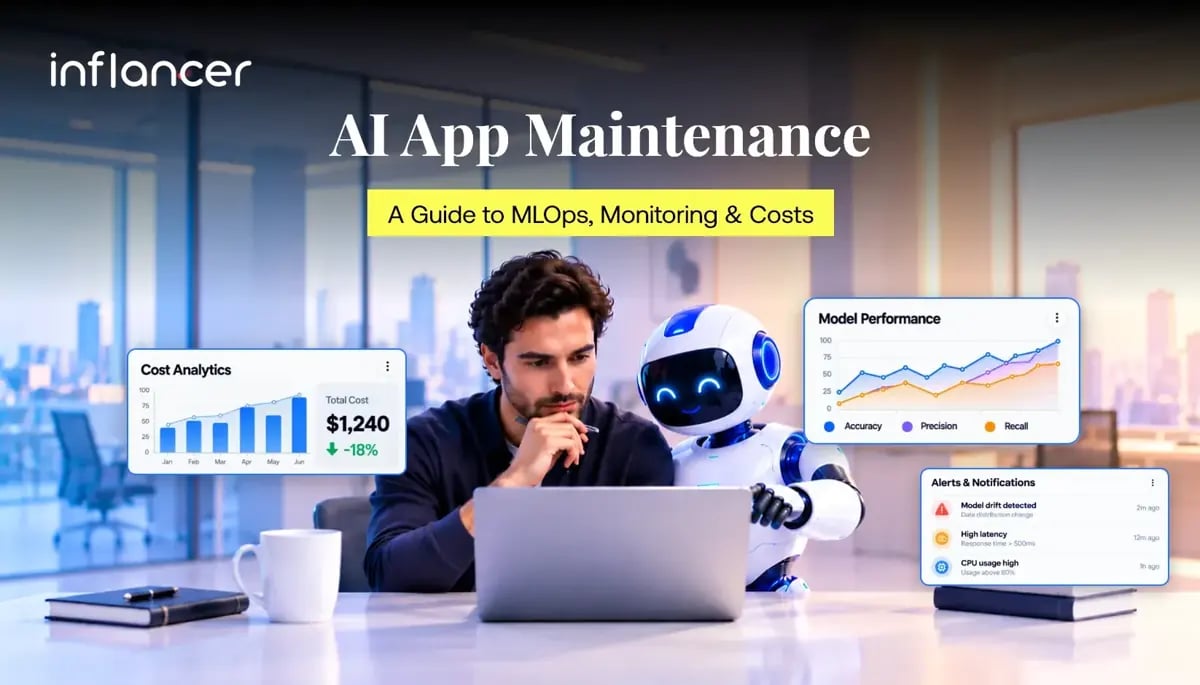
AI application maintenance means keeping the software, data pipelines, models and integrations working after launch. It includes monitoring service health, checking output quality, investigating drift, managing updates and controlling running costs. MLOps provides repeatable processes for testing, deploying and updating machine learning systems. Together, they give teams a structured way to operate AI beyond its first release.
Consider a hypothetical support assistant. The app opens normally and answers quickly, but some answers reference an outdated refund policy. An uptime dashboard would miss the problem. The maintenance team needs to examine the information behind the answer, evaluate the response and correct the right component.
That is the focus of this guide: what to maintain, which signals to watch, when retraining makes sense and how to build a transparent operating budget.
In a Nutshell
- AI application maintenance covers software updates, data checks, model monitoring and ongoing support.
- MLOps makes model testing, deployment, monitoring and retraining repeatable.
- Track output quality, response times, data changes and business results.
- Investigate performance issues before deciding whether retraining is needed.
- Validate model updates and maintain a tested rollback process.
- Budget for support, infrastructure, monitoring, data preparation, evaluation and retraining.
How Do You Maintain an AI Application After Launch?
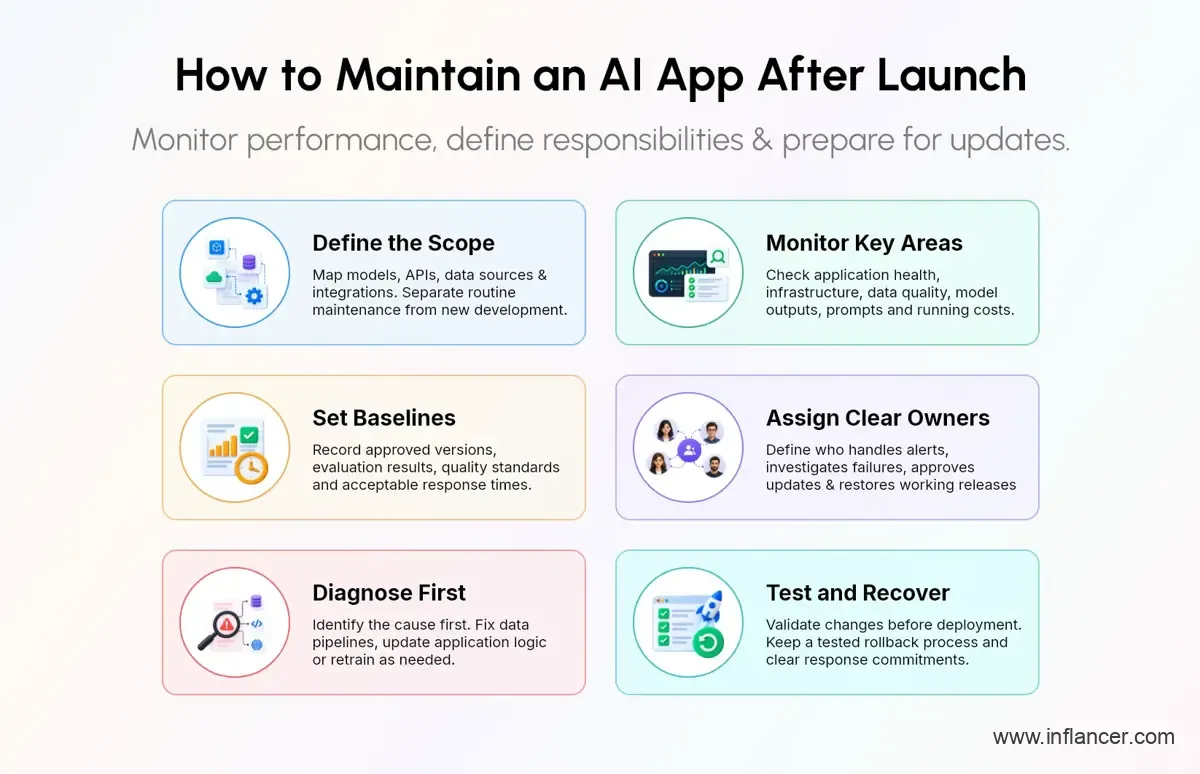
Maintain an AI application solutions by monitoring infrastructure, data quality, model outputs and business results. Establish performance baselines, assign incident owners, evaluate changes before deployment and keep a tested recovery process. Treat retraining as one possible response to a diagnosed problem, alongside repairing data pipelines or updating application logic.
1. Define the scope
Start by documenting what the application actually uses. Include its models, APIs, databases, data sources, scheduled jobs, integrations and deployment environments. Record who owns each component and which business workflow depends on it.
For AI application support and maintenance, use this proposed scope when discussing responsibilities with an internal team or service partner:
| Area | Maintenance responsibility |
|---|---|
| Application | Fix defects, test integrations and maintain dependencies |
| Infrastructure | Track availability, latency, capacity and recovery |
| Data | Validate schemas, freshness, completeness and processing |
| Models | Evaluate predictions, investigate drift and assess updates |
| Generative AI | Test prompts, retrieval, responses and tool actions |
| Operations | Manage alerts, incidents, releases and running costs |
Separate ongoing operations from new development. Adding another language, launching a new prediction task or replacing the model architecture may require a project beyond the maintenance agreement. Make that boundary explicit before comparing proposals.
2. Establish a baseline
Save an approved reference point for the live application. Include the deployed version, evaluation dataset, relevant quality measures and acceptable response times. Use representative examples from the intended workflow rather than relying entirely on demonstrations.
For a document extraction app, a practical baseline might record performance separately for invoice numbers, dates and totals. For a support assistant, define a review rubric for factual correctness, relevant sources and successful escalation. These are suggested evaluation choices, not universal requirements.
3. Assign clear ownership
Give every important alert an owner, a response procedure and an escalation path. Decide who can pause an AI feature, approve a replacement model or restore the previous release.
Ask the support team to distinguish an initial response from a resolution commitment. Acknowledging an alert does not mean the underlying problem has been fixed. Define both expectations in the service agreement, especially where the application supports time-sensitive work.
What is MLOps and Why Is It Important for AI Applications?
MLOps, or machine learning operations, applies engineering and operational practices across the model lifecycle. It connects data preparation, training, validation, deployment and production feedback through repeatable workflows. Google’s MLOps architecture guidance describes continuous integration, continuous delivery and continuous training as related parts of this approach.
Make updates repeatable
A model release needs more context than a file name. Teams need to identify which data, code, parameters and dependencies produced it. Google documents metadata tracking for reproducibility, while ML flow’s registry supports model versions, lineage, tags and aliases. These records help teams trace changes and manage deployment decisions.
When assessing machine learning operations services, request concrete deliverables: a working pipeline, a model registry, evaluation reports, documented release criteria and recovery instructions. A tool list alone does not explain how an update reaches production.
Match your architecture
Separate two operating situations in your maintenance plan:
- Custom models: Your team controls the training process and needs procedures for data preparation, retraining, validation and deployment.
- Hosted AI models: Your team maintains the application around a provider’s model, including prompts, retrieval, integrations and evaluations. Any fine-tuning work depends on the provider’s supported capabilities.
For a hosted model application, ask the provider which versions can be selected, how changes are announced and which usage controls are available. Do not assume your team can retrain the underlying model or preserve a version indefinitely. Verify those conditions in the applicable product documentation and contract.
Automate with gates
Ask MLOps implementation services providers to demonstrate what happens when validation fails. A useful workflow should stop an unsuitable release, retain its evaluation results and notify the responsible person.
Define approval rules according to the consequences of an incorrect output. For a higher consequence workflow, require explicit review before an updated model can influence live decisions. Use automation to carry out checks consistently while keeping release authority clear.
How Do You Monitor AI Model Performance in Production?
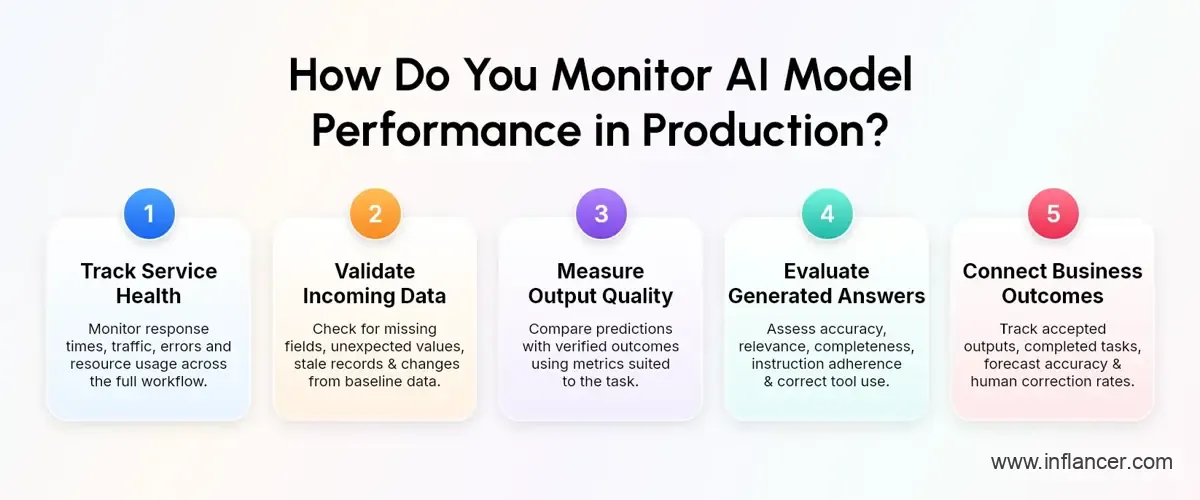
Monitor production performance across service health, input data, output quality and business outcomes. Compare current measurements with approved baselines, investigate changes by user segment and connect predictions with actual outcomes when those outcomes become available. Data drift alerts provide an investigation signal; they do not independently establish prediction accuracy.
1. Track service health
Google’s site reliability guidance identifies latency, traffic, errors and saturation as four core monitoring signals. Apply them to the user’s full workflow as well as the model endpoint.
For example, measure how long it takes to submit a document, process it and return usable fields. Record failed uploads and incomplete results alongside endpoint errors. Decide which failures require immediate intervention and which belong in a scheduled review.
Avoid relying exclusively on average response time. Review slower requests and error patterns so the team can identify which users or tasks need attention. Set service targets from the actual workflow rather than copying another application’s thresholds.
2. Validate incoming data
Build checks for missing fields, unexpected categories, invalid ranges and stale records. Compare production inputs with an appropriate reference dataset and examine changes over time. Google’s monitoring documentation distinguishes differences from training data from changes within production data.
In a hypothetical demand forecasting app, a new store location could introduce a legitimate input change. A pipeline that suddenly replaces missing sales figures with zero would require a different response. Ask the investigator to establish which situation occurred before proposing a model update.
For AI model monitoring, keep the alert evidence available: affected features, relevant time windows, sample volumes and recent upstream changes. This gives the investigation a concrete starting point.
3. Measure output quality
For supervised models, compare predictions with verified outcomes, also called ground truth labels, to measure performance. Use evaluation metrics suited to the task, as classification and regression require different measures.
Choose evaluation measures around the business error that matters. In a proposed fraud review workflow, track missed fraud and legitimate transactions flagged incorrectly. For forecasting, examine error by product or location as well as overall error.
Where outcomes arrive later, label the dashboard accordingly. Show when predictions were made, how many have verified outcomes and which cases remain unresolved. Do not describe an incomplete outcome sample as a complete accuracy assessment.
4. Evaluate generated answers
For generative AI, create task-specific evaluations using representative prompts and reference material. Assess responses for accuracy, relevance, completeness and adherence to instructions, using criteria suited to the application.
For a support assistant, a suggested review rubric could ask whether the answer follows current policy, cites relevant material and escalates appropriately. For an agent, also test whether it selects the intended tool and supplies valid arguments.
Keep examples of failed answers and convert verified failures into regression tests. Review the source content, retrieved passages, prompt and tool result together before deciding which component needs work.
5. Connect business outcomes
Track business results alongside technical metrics, such as accepted document extractions, completed support tasks, forecast accuracy and human correction rates.
Use these measures to guide improvements. If outputs meet quality standards but users keep abandoning the workflow, investigate usability and process issues before retraining the model.
Know How Your AI Application Performs in Production
Discuss monitoring priorities with Inflancer to define what to track, when to investigate and who should respond.
How Often Should Machine Learning Models Be Retrained?
Set retraining frequency using performance evidence, data availability and the pace of change in the business. Google’s MLOps guidance describes triggers such as schedules, new data and performance degradation. Choose triggers for the specific model, then validate every candidate before deployment.
Use meaningful triggers
For machine learning model retraining, consider these proposed decision rules:
| Signal | Next investigation |
|---|---|
| Verified quality decline | Check recent errors and compare with baseline |
| Changed input patterns | Examine drift and its effect on outcomes |
| Enough new labeled data | Assess coverage, quality and training value |
| New business conditions | Review task definitions, features and targets |
| Scheduled review | Confirm whether an update is justified |
Make trigger definitions specific. “Accuracy looks lower” is difficult to act on. A documented measure, evaluation window and minimum sample requirement give the reviewer something testable.
Treat calendar reminders as review opportunities. Decide whether the evidence supports training a candidate, collecting more labels or leaving the deployed version in place.
Diagnose before retraining
Check the pipeline before changing model weights. Google’s engineering guidance identifies differences between training and serving data processing as one source of production problems. Retraining alone does not establish that those differences have been corrected.
Consider a hypothetical model that expects purchase values in one currency. If an upstream integration changes the unit without updating preprocessing, repair and test that integration first. Then reassess performance using corrected inputs.
Likewise, when a retrieval-based assistant uses outdated policy documents, investigate content freshness and retrieval behavior before proposing fine-tuning. Frame the intervention around the verified cause.
Validate the candidate
Require the candidate model to pass agreed tests before it replaces the current version. Compare it with the deployed model on the same evaluation data, then inspect the segments most important to the workflow.
Include data separation checks so evaluation examples do not leak into training. For time-dependent tasks, ask the team to explain how its testing represents predictions made with information available at the time.
Record why the candidate was approved or rejected. Keep the evaluation report with the model version so later investigations can reconstruct the decision. Agree on deployment and recovery checks before the release begins.
How Much Does AI Model Maintenance Cost?
AI model maintenance cost depends on support effort, hosting or API usage, monitoring, data preparation, evaluation and retraining.
1. Build the budget
Use this planning formula:
Monthly operating budget = support labor + hosting or API usage + monitoring and storage + data and evaluation + retraining allowance.
Treat each category as a separate line item. Ask whether a service quote includes cloud charges, labeling, model updates, incident response and after-hours coverage. Record usage limits and the price of work outside the agreement.
2. Illustrative monthly calculation
The figures below are hypothetical planning inputs, not market benchmarks, vendor prices or a Inflancer quotation. They show how a team could calculate a budget after obtaining its own rates and usage estimates.
| Budget item | Illustrative calculation | Monthly amount |
|---|---|---|
| Support engineering | 40 hours × $60 | $2,400 |
| Hosting or AI API usage | Assumed workload allowance | $900 |
| Monitoring and storage | Assumed monthly allowance | $250 |
| Data review and evaluation | 10 hours × $40 | $400 |
| Retraining reserve | $1,200 quarterly ÷ 3 | $400 |
| Total | $2,400 + $900 + $250 + $400 + $400 | $4,350 |
At those unchanged inputs, the annual operating budget would be $4,350 × 12 = $52,200, excluding initial setup, taxes and additional project work.
For a simple sensitivity check, keep the non-support allowance at $1,950. At the same illustrative $60 hourly rate, 20 support hours produce a $3,150 monthly total; 80 hours produce $6,750. This calculated range demonstrates the effect of support effort.
3. Separate setup costs
Request a separate estimate for work needed to establish operations. Suggested setup items include assessing the existing application, instrumenting missing metrics, creating evaluation datasets, configuring pipelines and testing recovery procedures.
Ask for acceptance criteria for each item. “Monitoring configured” should identify the monitored signals, tested alerts, named owners and available evidence. This makes the proposal easier to review than a broad promise of ongoing optimization.
4. Compare operating assumptions
When comparing AI model maintenance services, give each provider the same workload description. Include model count, expected traffic, operating hours, data sources, release frequency and response expectations.
Ask for scenarios covering expected usage and a higher workload. Keep labor, infrastructure and third-party charges visible in both. Avoid comparing a limited support retainer with a proposal that also includes hosting, evaluation and incident coverage.
How Can Businesses Control Ongoing AI Maintenance Costs?
Start with visibility into usage and capacity. Examine endpoint utilization, comparing suitable compute options and using scaling mechanisms where appropriate. Allocate spending to the relevant workload and reviewing costs alongside results.
Match capacity to demand
Review idle resources and capacity reserved for peak traffic. Test infrastructure changes against latency and availability targets before reducing capacity. For work that does not require immediate results, evaluate whether a scheduled processing design fits the business requirement.
For API-based applications, ask the team to report request volumes, response lengths, retries and duplicate work. Verify available pricing and usage controls directly with the selected provider before estimating savings.
Measure useful work
Track a unit that reflects an accepted business result. Use cost per document processed successfully without manual correction.
For example, an assumed monthly operating expense of $4,000 divided by 20,000 accepted documents equals $0.20 per accepted document. Keep the acceptance definition consistent when comparing periods. This is a calculation example, not a claim about achievable performance.
Include human review costs when they are part of producing the accepted result. Record changes in workload mix so a lower average does not hide deteriorating results on more difficult tasks.
Review recurring work
Use the monthly review to identify repeated incidents, unnecessary evaluation runs and manual steps that could be standardized. Prioritize improvements using recorded effort and business consequences.
Ask the team to estimate implementation effort before automating a small task. A maintenance improvement should have a clear purpose, an owner and a way to verify whether it reduced effort or improved reliability.
Plan Your AI Maintenance Budget Around Actual Workloads
Review support needs, infrastructure usage and evaluation requirements with Inflancer to define a scope your team can budget.
What Should an AI Maintenance Plan Include?
Use the following as a proposed operational checklist when defining AI application maintenance responsibilities. Adapt it to the application’s consequences, available staff and existing controls.
1. Release and recovery
Document how updates reach production and how the team restores a working release if something goes wrong. Cover application code, model versions, preprocessing, configuration and external dependencies.
Keep version histories, test results and deployment records accessible. Define how the team approves releases, tracks deployed versions and rolls back to a previously validated version.
Test recovery in an appropriate environment before relying on it during an incident. Record which external dependencies cannot be restored by your team and define the fallback workflow for those cases.
2. Security and access
For an AI assistant with connected tools, test for unauthorized actions and prompt injection through user input or retrieved content. Check whether manipulated instructions could expose sensitive information or trigger unintended tool actions.
Review permissions across the application and connected tools. Define which actions require approval, what information can be logged and who can access those records. Involve security and privacy teams in setting deployment requirements.
3. Reporting and ownership
Request a maintenance report that explains service health, evaluation results, incidents, releases, spending and pending decisions. Keep recommendations tied to evidence: what changed, why it matters and what action is proposed.
Define who accepts completed work and who approves additional spending. For ongoing MLOps services, revisit those responsibilities when the application gains new models, data sources or decision-making capabilities.
How Should Teams Handle an AI Production Incident?
Use a documented response procedure that starts with the affected business workflow. The sequence below is a proposed operating approach. Adapt its approval steps and response times to your application rather than treating it as a universal service standard.
Confirm the impact
Record what users are experiencing, when the issue began and which workflows are affected. Separate a service outage from incorrect outputs, delayed processing or an unexpected cost increase. Identify recent releases and upstream changes without assuming that the most recent change caused the incident.
Preserve relevant evidence with appropriate access controls. Include version identifiers, timestamps, affected request references and the evaluation results available at that point. Avoid copying sensitive production records into unrestricted debugging channels.
Contain the problem
Choose a fallback that matches the failure. Options to assess include temporarily disabling the affected feature, routing work to human review, pausing a scheduled job or restoring a tested release. Confirm who can authorize each action before an incident occurs.
After containment, verify the user journey again. A successful endpoint response is only one check. Confirm that the intended task completes and that the fallback does not create duplicate records, missed requests or an uncontrolled processing backlog.
Verify the correction
Ask the investigator to connect the proposed fix with the observed cause. If a data mapping error was responsible, test the mapping and representative downstream results. If a model update is proposed, require evidence that it addresses the failure without introducing an unacceptable regression.
Record the checks performed, the release decision and the person responsible. Keep unresolved questions visible instead of closing the incident because the most obvious symptom disappeared. Define a follow-up observation period appropriate to the task and available outcome data.
Improve the procedure
After recovery, review why existing checks did or did not detect the issue. Convert the verified failure into a test, alert or documented exception where appropriate. Assign corrective work to an owner and agree on how completion will be verified.
Use the review to identify recurring causes rather than counting closed tickets alone. Ask whether repeated failures share a data source, integration or release step. Prioritize the next improvement using recorded impact and implementation effort.
What Should the First Maintenance Review Cover?
For the first review after handover, request a demonstration of the operating process. Ask the team to locate the current model version, explain the latest evaluation and show where an alert reaches its owner.
Then walk through one hypothetical failure together. Ask what the team would investigate, what evidence it would collect and when it would pause the affected workflow. Check that the recovery instructions refer to the application actually deployed.
Finish by reviewing the spending breakdown and open decisions. Confirm whether any missing access, evaluation data or ownership prevents the team from delivering the agreed support. Give each gap a responsible person and a completion condition. Include these decisions in the written scope before ongoing support begins.
How Can Inflancer Support Post-Launch AI Operations?
Inflancer provides AI application support and maintenance to help businesses manage their AI systems after launch. Its MLOps services cover AI model deployment and monitoring, model versioning, drift detection and machine learning model retraining, helping teams track performance and manage updates as production data changes. Share your application’s architecture, known issues, evaluation results and usage requirements to discuss a support plan with clear deliverables, responsibilities, service coverage and costs.
Keep Your AI Application Performing Beyond Its Launch
Discuss monitoring, retraining and maintenance priorities with Inflancer to define a practical post-launch support scope today.
Frequently Asked Questions
Get the weekly updates on the newest brand stories, business models and technology right in your inbox.