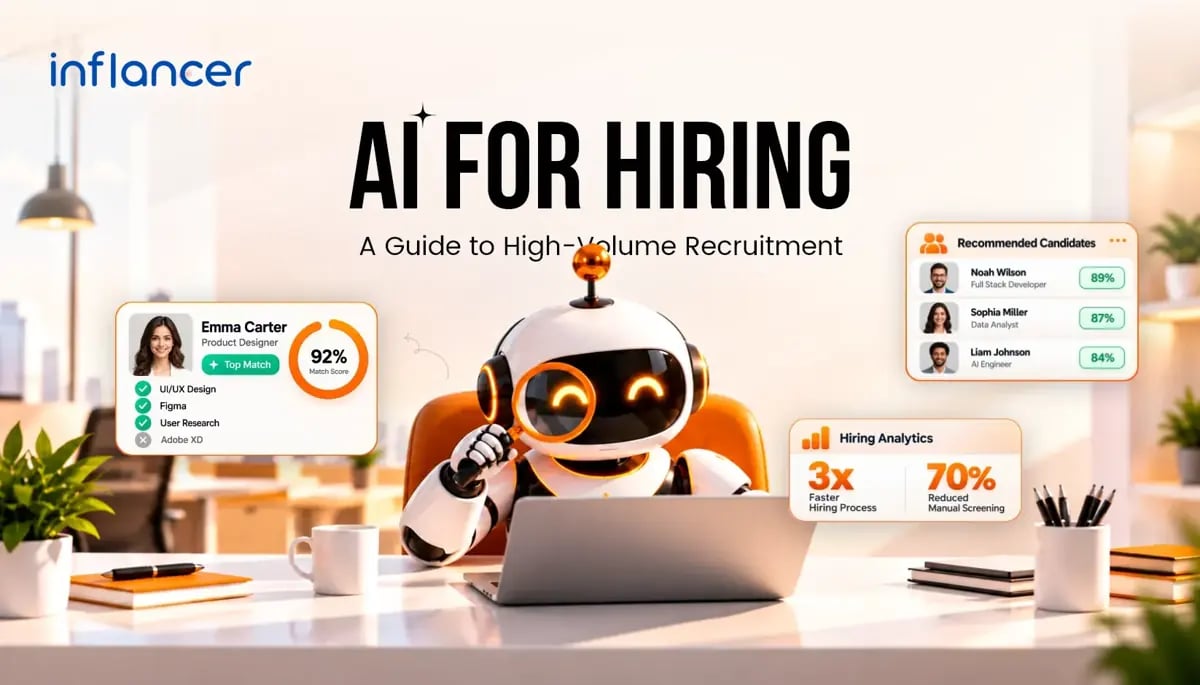
An AI recruiting platform automates the repetitive work in hiring: sourcing, screening, ranking, and scheduling. Inflancer built HireGroww for teams that receive hundreds or thousands of applications per role and cannot afford to read them one by one. AI for hiring compresses days of manual review into minutes, applies the same criteria to every applicant, and returns recruiter hours to the work that closes offers.
High-volume hiring exposes the limits of manual recruiting fast. Inboxes fill, strong candidates wait, and recruiters burn out on admin. AI recruitment software fixes the process, not just the pace.
This guide explains what an AI hiring platform does, how AI candidate screening works, where automation helps, where human judgment must stay, and how to run a high-volume hiring workflow from role setup to offer.
In a Nutshell
- An AI recruiting platform automates resume parsing, screening, ranking, scheduling, and candidate updates.
- AI recruitment automation shortens time-to-hire and keeps evaluation consistent at any volume.
- AI ranks and shortlists. Recruiters make the final hiring decision.
- Choose a platform on scoring transparency, integrations, bias controls, security, and scalability.
What Is an AI Recruiting Platform?
An AI recruiting platform is software that uses machine learning and natural language processing to automate recruiting tasks. It reads resumes, compares candidates against job requirements, ranks applicants by fit, and coordinates interviews without manual handoffs.
Think of it as the working layer on top of your hiring data. A traditional applicant tracking system (ATS) stores applications and tracks status. An AI hiring platform acts on those applications. It decides which ones deserve attention first and triggers the next step automatically.
Most AI recruitment software combines four layers:
- Parsing: extracts skills, experience, education, and location from resumes in any format.
- Matching: compares candidate data against the criteria set for the role.
- Automation: triggers outreach, reminders, status updates, and interview booking.
- Analytics: reports on funnel speed, drop-off points, and source quality.
Common AI recruiting tools inside a platform include resume parsers, screening engines, chatbots for candidate queries, scheduling assistants, and reporting dashboards. Some teams buy these as separate tools. A unified platform removes the gaps between them and keeps candidate data in one place.
How Is AI Used in The Hiring Process?
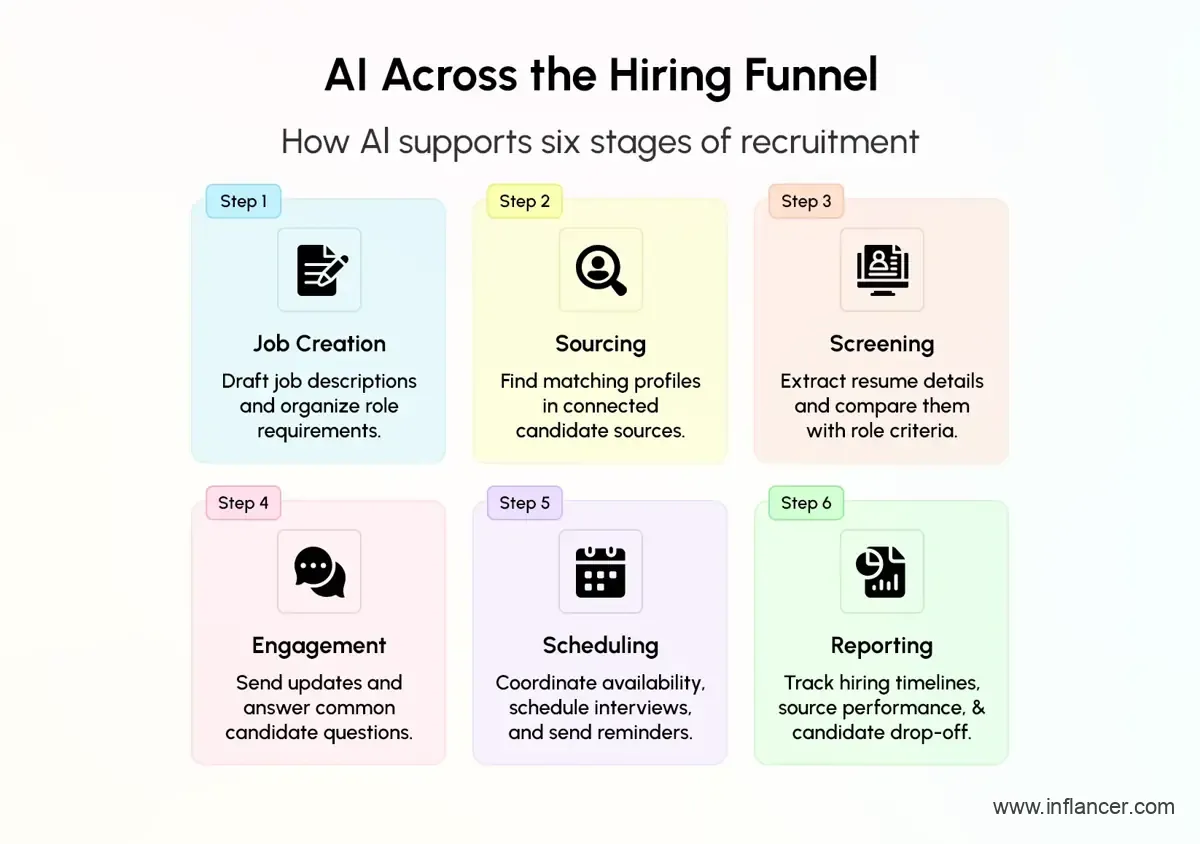
AI in recruitment can support different stages of the hiring process. Teams should identify which tasks their chosen software supports, define the criteria it will use, and decide where recruiter review is required.
1. Job creation
AI drafts job descriptions from a short brief, standardizes role requirements, and flags wording that discourages qualified applicants. Clear, structured job criteria also feed every downstream step, so this stage shapes screening quality.
2. Sourcing
AI searches job boards, internal databases, and past applicant pools for matching profiles. Past applicants are an underused asset. A platform can resurface people who applied for a different role month ago and now fit a new opening.
3. Screening
AI parses each resume, extracts structured data, and scores fit against role criteria. This is the stage where high-volume hiring gains the most time.
4. Engagement
Automated messages acknowledge applications, share updates, collect missing information, and answer common questions. Candidates stay informed without recruiters typing each reply.
5. Scheduling
AI matches candidate availability with recruiter and panel calendars and books interviews. Reminders reduce no-shows.
6. Reporting
Dashboards show time-to-shortlist, time-to-hire, source performance, and stage-wise drop-off. Hiring managers see where the process slows and can fix it.
Recruiters stay in charge of interviews, evaluation, stakeholder alignment, negotiation, and offers. AI handles the repeatable steps around them.
Why Does High-Volume Hiring Need More Automation?
High-volume hiring means filling many similar roles in a short window. Customer support, sales, retail, logistics, BPO, healthcare staffing, and campus recruitment drives all follow this pattern. A single job post can attract hundreds of applications. A hiring campaign can attract tens of thousands.
Manual processes fail in predictable ways at that scale:
- Recruiters skim instead of read, so qualified candidates get missed.
- Response times stretch from hours to weeks, and good candidates accept other offers.
- Screening quality varies by recruiter, by day, and by workload.
- Scheduling consumes hours of back-and-forth across calendars.
- Reporting stays manual, late, and incomplete.
- Recruiters spend their time on admin, which lowers morale and raises turnover on the hiring team itself.
Hiring speed also affects employer brand. Candidates who hear nothing for weeks form a negative impression, and they share it. A slow process costs more than time.
High-volume hiring software removes these bottlenecks by treating application number 5 and application number 5,000 the same way. It applies identical criteria, responds on time, and keeps every record structured.
Volume also creates seasonality. Hiring teams face spikes during festive periods, new store launches, or project ramp-ups. Adding recruiters for each spike is slow and expensive. Automation absorbs the peak without adding headcount.
Can AI Automate High-Volume Recruitment?
Yes, AI and workflow automation can support high-volume recruitment by assisting candidate recommendations, communications, and interview coordination. Commercial recruiting software includes group interview management and automated scheduling capabilities. The supported activities depend on the deployment, so evaluate the complete campaign workflow before launch.
For this guide, high-volume hiring means recruiting many people, processing a large applicant pool, or running several hiring streams at once. Use your own workload and deadlines to define what “high volume” means operationally.
Start by mapping the campaign. Record the roles, locations, headcount, application sources, assessment requirements, interview capacity, and decision owners.
Then identify the tasks suitable for automation and the points requiring review. Build your AI recruitment automation plan around specific actions, approved criteria, and named owners.
Use the following planning table to assign automation tasks, evidence checks, and decision ownership before launching a larger recruitment campaign.
| Hiring stage | Task to evaluate for automation | Recommended human responsibility |
|---|---|---|
| Application intake | Capture and organize candidate records | Check missing or conflicting information |
| Resume processing | Extract relevant profile fields | Verify extraction quality |
| Initial screening | Apply approved role criteria | Review uncertain and excluded profiles |
| Assessments | Distribute approved exercises | Confirm relevance and accessibility |
| Evaluation | Produce scores and summaries | Inspect evidence and disputed scores |
| Interview coordination | Send invitations through supported workflows | Handle exceptions and special requests |
| Final selection | Prepare evidence for decision-makers | Make and document selection decisions |
Keep a separate review list for candidates who need extra attention. This could include resumes the system cannot read, requests for assessment adjustments, unfinished tests, disputed scores, or experience that needs clarification.
Assign someone to review these cases and set a clear response time. Make sure recruiters can pause the process so candidates are not automatically rejected before their situation is understood.
Ready to Bring More Structure to Your Hiring?
Discuss your screening challenges and recruitment workflow with our team to plan your next steps.
How Does AI Screen Candidates for Jobs?
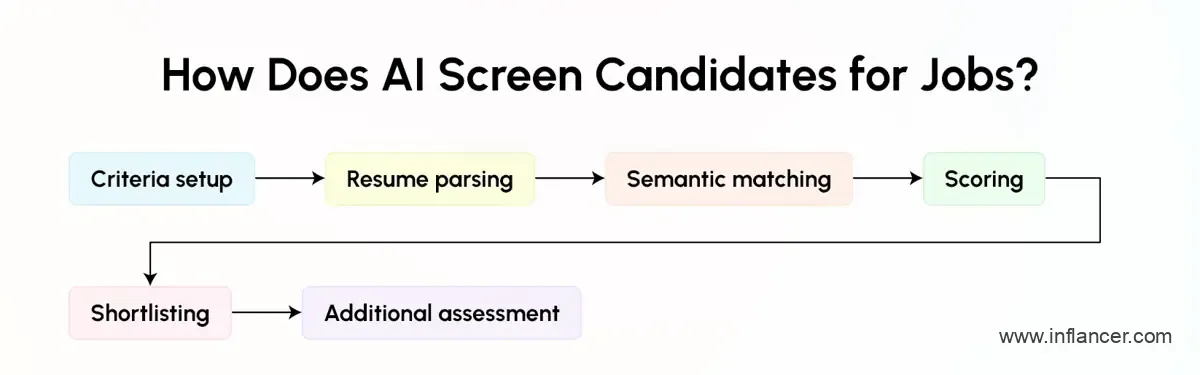
AI candidate screening scores applicants against defined role criteria.
AI candidate screening follows a structured sequence. Understanding it helps teams configure the platform well and trust the output.
Step 1: Criteria setup
The recruiter defines must-have skills, preferred skills, experience range, location, notice period, and any knockout conditions. The quality of this input decides the quality of the output.
Step 2: Resume parsing
The system reads each resume and converts unstructured text into structured fields: job titles, employers, skills, tenure, education, and certifications. Modern parsers handle varied formats, including PDFs, documents, and profile exports.
Step 3: Semantic matching
Natural language processing compares meaning, not just keywords. A resume that says “client onboarding” can match a requirement for “customer implementation.” This reduces the false rejections that keyword filters cause.
Step 4: Scoring
Each candidate receives a fit score based on weighted criteria. Strong platforms show the reasoning behind the score, such as which skills matched and which were missing.
Step 5: Shortlisting
Candidates above the threshold move into the recruiter’s review queue, ranked by fit. Candidates below the threshold can receive an automated status update.
Step 6: Additional assessment
Screening questions, short skill tests, or video responses add signal beyond the resume, especially for roles where resumes say little.
Transparency matters at every step. If a platform returns a score with no explanation, recruiters cannot verify it, and candidates cannot be treated fairly. Look for visible match reasons, adjustable weights, and manual override options.
What Are the Benefits of AI Recruitment Software?
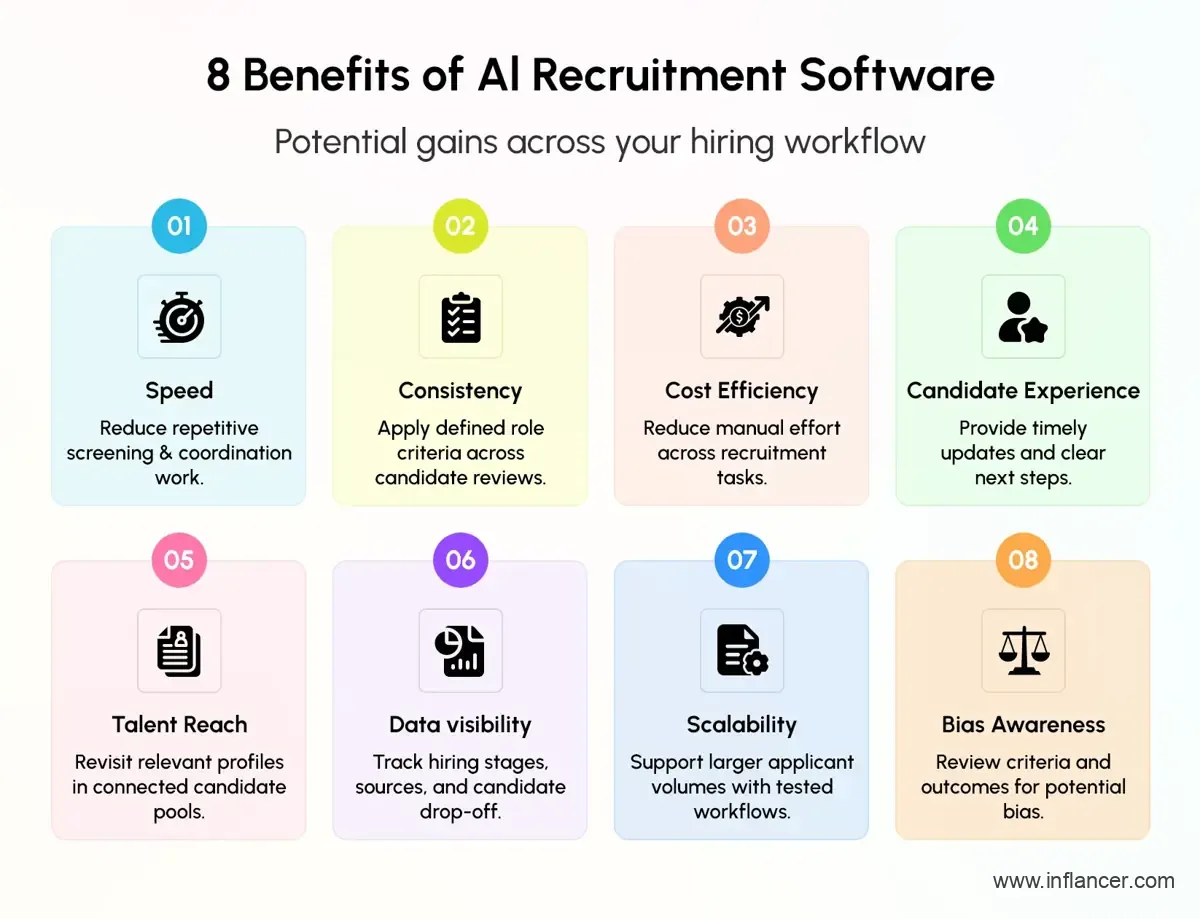
The benefits of AI recruitment software show up in speed, quality, cost, and experience.
- Speed: Screening that took days takes minutes. Time-to-shortlist drops, and time-to-hire follows. Faster cycles also protect offer acceptance rates because candidates do not drift to competing offers.
- Consistency: Every application is judged against the same criteria. This reduces variation between recruiters and makes the process easier to document and defend.
- Lower cost per hire: Less manual effort goes into each filled role. Teams fill more positions without adding recruiters, and agency dependence can fall.
- Better candidate experience: Applicants receive acknowledgments, updates, and interview slots quickly. Even rejected candidates leave with a clearer picture of where they stand, which protects employer brand.
- Wider talent reach: Platforms resurface past applicants, silver medalists, and passive profiles. Strong candidates who applied earlier no longer disappear into an archive.
- Data visibility: Funnel analytics show where candidates drop off, which sources produce quality hires, and which stages slow down. Teams fix problems with evidence rather than guesses.
- Scalability: Volume spikes no longer require emergency staffing. The same platform handles a hundred applications or a hundred thousand.
- Bias awareness: Used well, structured criteria and anonymized screening options reduce the influence of irrelevant factors. This requires regular audits, since AI can also reflect bias in its training data or criteria.
How Can AI Recruitment Software Improve Recruiter Productivity?
Recruiters lose a large share of their week to coordination and data handling. Reading unsuitable resumes, copying details between systems, chasing calendars, and writing the same email repeatedly all consume hours that could go to candidate conversations.
AI recruitment software returns that time in four areas.
- Resume review: Manual reading gives way to ranked shortlists. Recruiters start the day with the best matches at the top rather than a flat list of unread applications.
- Scheduling: Email chains give way to self-booking links and automated calendar matching. A single interview round that once took a day of coordination takes minutes.
- Follow-ups: Individual messages give way to triggered workflows. Acknowledgments, reminders, document requests, and rejections go out on time without recruiter effort.
- Reporting: Spreadsheets give way to live dashboards. Hiring managers see progress without asking for updates, which cuts status meetings.
The downstream effect is shorter time-to-hire and higher recruiter capacity. A recruiter who handled a fixed number of open requisitions can handle more, with better quality on each.
Measure the gain with three metrics:
- Time-to-shortlist: hours from application close to a reviewed shortlist.
- Time-to-hire: days from job post to accepted offer.
- Requisitions per recruiter: the number of open roles one recruiter manages effectively.
Record these before rollout. Without a baseline, productivity gains stay anecdotal.
Can AI Recruiting Software Rank and Screen Candidates?
AI recruiting software ranks candidates using weighted criteria such as skills, experience, role relevance, education, certifications, and location. Recruiters can adjust the weights by role. A sales role may weight communication and target achievement heavily. A technical support role may weight tool knowledge and certifications.
Ranking works best under these conditions:
- Job criteria are specific and measurable. Vague requirements produce vague rankings.
- Scores come with explanations that a recruiter can read in seconds.
- Recruiters can override, re-rank, or reopen rejected candidates.
- The system is audited regularly for adverse patterns across candidate groups.
- Thresholds are tuned using real hiring outcomes, not set once and forgotten.
Screening and ranking are related but separate functions. Screening filters out candidates who fail mandatory requirements. Ranking orders the remaining candidates by relative fit. A good platform does both and lets recruiters see each decision.
Feedback loops improve accuracy. When recruiters accept or reject shortlisted candidates, the platform learns which signals predict a good hire. Teams that review this feedback monthly see better shortlists over time.
One point stays constant. AI ranks. Humans decide. A ranking is a recommendation that speeds up review, not a verdict on a person.
How Do You Use an AI Recruiting Platform for High-Volume Hiring?
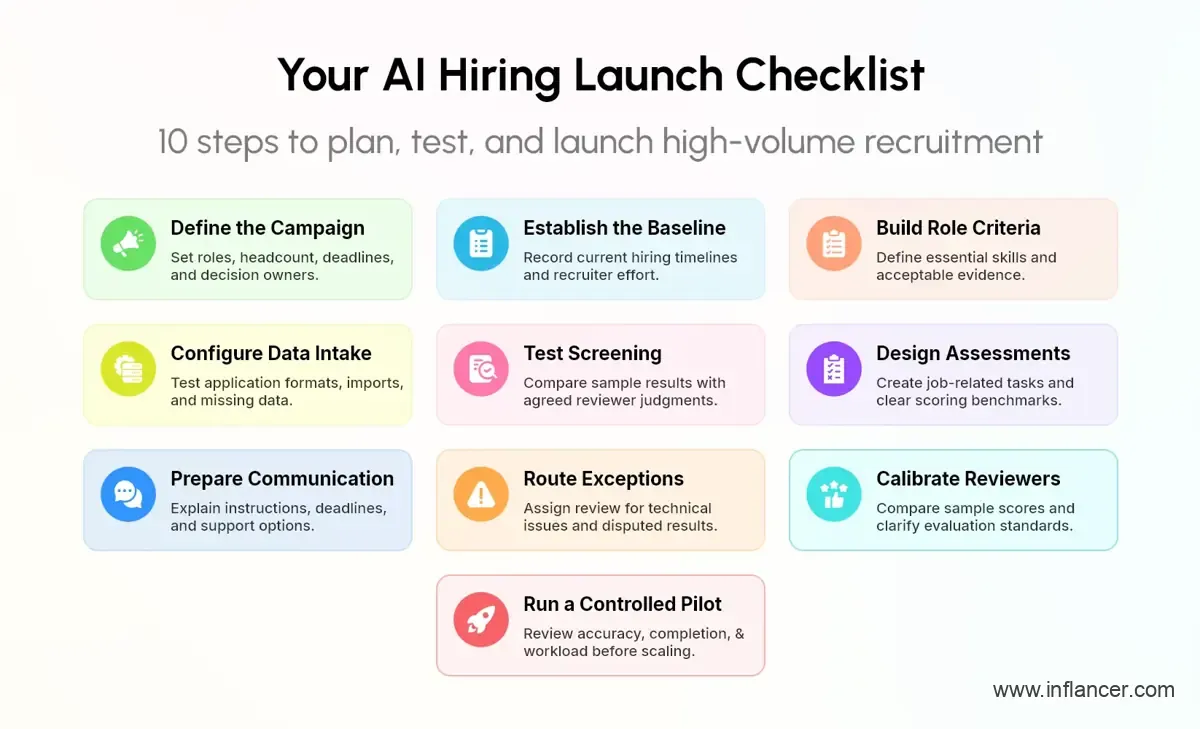
Use an AI recruiting platform by defining the campaign, translating role requirements into screening criteria, testing candidate processing, and running a controlled pilot. Expand after reviewing accuracy, completion, workload, and selection outcomes. The following steps are a recommended implementation framework that teams can adapt to their roles and operating conditions.
1. Define the campaign
Write a campaign brief before configuring software. Include headcount by role, location, start-date requirements, application channels, recruiter ownership, and interview availability.
Agree on the result the campaign must deliver. Distinguish applicants processed, candidates interviewed, offers accepted, and employees who start.
Set review capacity explicitly. Decide who will handle exceptions, who can approve changes, and who can pause the campaign. Include those responsibilities in the brief rather than leaving them for launch day.
2. Establish the baseline
Measure the existing process using records your team can verify. Record application-to-review time, assessment completion, interview waiting time, and offer acceptance.
For manual effort, use a defined observation period. Include resume handling, coordination, evaluation, and corrections.
Write down how each measure is calculated. If you lack reliable historical data, establish a baseline during a measured initial period rather than inventing a comparison.
3. Build role criteria
Separate essential requirements from preferences. Ask the hiring manager to explain why each essential requirement belongs in the role.
Translate broad expectations into specific evidence. For “problem-solving,” define the problem candidates must address and what a satisfactory response contains.
Approve the criteria before evaluating the live applicant pool. Record changes with their reason and effective date, so reviewers know which version applies.
4. Configure data intake
Test the formats and submission channels your candidates will use. Confirm how the system handles unreadable documents, incomplete fields, and repeated submissions.
Keep the original application accessible during review. Check how corrected data appears in later screens and reports.
Confirm whether imports and integrations are supported for your deployment. Assign responsibility for resolving failed transfers and reconciling record counts.
5. Test screening
Use a controlled sample with known evidence and agreed reviewer judgments. Include clear matches, clear non-matches, and cases requiring clarification.
Compare the software’s outputs with those judgments. Investigate disagreements at the criterion level.
Avoid optimizing only for agreement with historical selections. Ask whether those historical decisions used appropriate evidence and whether the proposed screening rules fit the current job.
6. Design assessments
Select exercises connected to the work. For a customer-support role, a recommended exercise is responding to a customer issue using a supplied policy. For a developer, consider a relevant coding or debugging task.
Define what a strong response demonstrates. Specify scoring benchmarks, permitted resources, completion conditions, and handling of technical interruptions.
Have subject experts review the exercise before launch. Test the candidate experience as well as the evaluator’s view.
7. Prepare candidate communication
Write invitations that explain the role, assessment purpose, completion requirements, deadline, and support route.
Tell candidates how to request assistance or an alternative arrangement. Confirm which communications the platform sends automatically and which require another supported system.
Review templates before distribution. Check names, role labels, links, time zones, and instructions. Assign someone responsibility for answering questions generated by the campaign.
8. Route exceptions
Create review categories for missing evidence, technical failures, accommodation requests, and disputed results.
Specify the action for each category. That may involve asking a candidate to clarify information, arranging another assessment format, or correcting a profile.
Set a rule that unresolved exceptions receive review before a final action. Test the routing with sample cases, including what happens when the responsible recruiter is unavailable.
9. Calibrate reviewers
Ask reviewers to score the same sample responses independently. Compare their reasoning, then clarify ambiguous benchmarks.
Structured interviews use predefined questions and proficiency benchmarks to constrain evaluation. Apply the same discipline to your review process, while recognizing that consistency alone does not establish that an assessment measures the right capability.
Give reviewers permission to disagree with a software result and require a recorded reason.
10. Run a controlled pilot
Launch with a defined role or campaign segment. Specify the period, review sample, success measures, and stopping conditions in advance.
Check candidate completion, parsing corrections, screening disagreements, and recruiter workload. Include candidates routed away from the main shortlist in your review.
Expand only after resolving material issues. Maintain a version record of the screening rules, assessments, and communication templates used in the pilot.
Want to Test AI Screening Before Scaling Recruitment?
Review your role criteria and evaluation process with our team before planning a broader rollout.
Where Does HireGroww by Inflancer Fit into High-Volume Hiring?
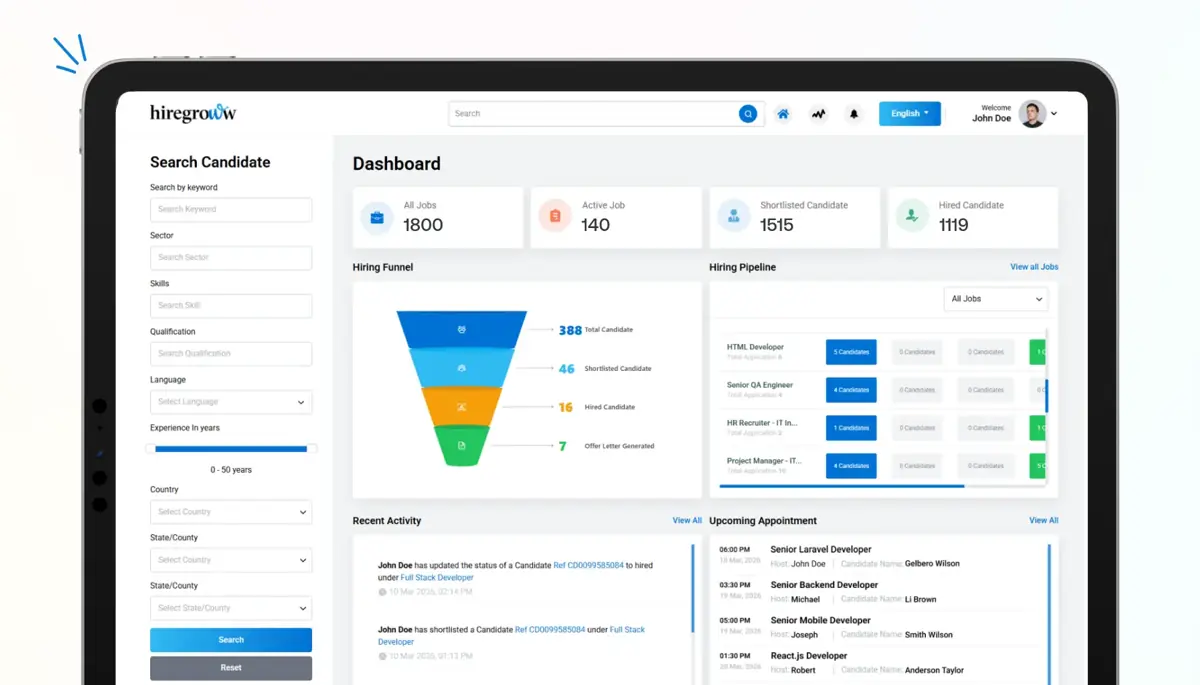
HireGroww brings screening, ranking, and workflow automation into one platform. It is built for teams that hire at scale and need speed without losing control over decisions.
Where it fits in the hiring workflow:
- Application intake: HireGroww captures every applicant and structures the data from the first touchpoint.
- AI screening: The platform scores candidates against your role criteria and applies the same logic to every application.
- Shortlisting: Recruiters receive a ranked queue to review rather than an unsorted inbox.
- Workflow automation: Communication, reminders, and scheduling steps run automatically once criteria are met.
- Reporting: Funnel performance appears in one view, so hiring managers see speed, drop-offs, and source quality without manual compilation.
HireGroww suits staffing firms, enterprise talent acquisition teams, BPOs, and growing companies that run frequent hiring drives. Because Inflancer builds AI and custom software for a living, the platform can be configured around your process rather than forcing your team into a fixed template.
To explore HireGroww further, read Inflancer’s case study on AI-powered recruitment and skill assessment. Use it alongside a product demonstration to assess how the platform fits your screening and evaluation needs.
What Should Businesses Consider When Choosing an AI Recruiting Platform?
Vendors describe similar features in similar language. The differences appear in how the platform behaves with your data and your process. Use these criteria to separate them.
- Screening transparency: The platform should explain every score. Ask to see a candidate card with visible match reasons. Black-box scoring creates risk for recruiters and candidates.
- Customization: Role-specific criteria, adjustable weights, and configurable workflows matter more than a long feature list. A customer support drive and a software hiring drive need different logic.
- Integrations: Confirm connections to your ATS, HRMS, job boards, email, and calendar tools. Weak integrations push manual work back onto recruiters.
- Bias controls: Look for audit reports, anonymized screening options, adjustable criteria, and recruiter override rights. Ask how the vendor tests for adverse impact.
- Data security and compliance: Check encryption, role-based access, data retention controls, and alignment with applicable data protection laws. Candidate data is sensitive, and a breach damages trust quickly.
- Scalability: Test performance with realistic peak volumes. A platform that works for 200 applications can slow down at 20,000.
- Candidate experience: Applications should work on mobile, load fast, and keep candidates informed. A clunky experience loses applicants before screening begins.
- Support and onboarding: Ask about implementation timelines, training, and ongoing support. Adoption depends on how well your team is trained in the first month.
- Pricing model: Match the pricing structure to your hiring pattern. Per-seat, per-requisition, and volume-based models suit different teams.
- Vendor expertise: A vendor with real AI engineering depth can adapt the platform as your needs change. Ask who builds and maintains the models.
If you plan to build or extend a custom recruitment solution, assess the engineering expertise needed to maintain it. Explore what to consider before you hire dedicated AI engineers.
The best test is a live demo with your own job description and a sample batch of real resumes. Compare the shortlist, the platform produces against what your recruiters would pick.
AI Should Support Recruiters, Not Replace Hiring Judgment
AI is strong at speed, pattern matching, and consistency. It is weak at context, nuance, and human circumstances. A candidate with an unusual career path may score low on a standard rubric and still be an excellent hire. Only a person can recognize that.
Responsible AI hiring rests on clear rules:
- A recruiter reviews every shortlist before action is taken.
- Borderline rejections receive a human check.
- Scoring criteria are reviewed for bias on a fixed schedule.
- Candidates are told that AI supports the process.
- Candidates can request a human review of their application where regulations or policy allow.
- Final hiring decisions stay with people.
Regulation is also moving in this direction. Several regions now require transparency, audits, or human oversight for automated employment decisions. Teams that build these practices early face fewer surprises later.
Treat AI as a capable assistant that prepares the ground. The recruiter still listens, probes, judges, and decides. Platforms designed around this principle produce faster hiring and fairer outcomes than platforms designed to remove people from the process.
Why Choose Inflancer’s HireGroww For High-Volume AI Recruitment?
High-volume hiring rewards teams that respond quickly, evaluate consistently, and keep recruiters focused on people. HireGroww supports all three. It combines AI candidate screening, ranking, and workflow automation in one platform, reduces manual effort, and gives hiring managers a clear view of the funnel.
Inflancer brings deep experience in AI development, custom software, and digital transformation. That experience shapes HireGroww into a platform that adapts to your hiring process rather than forcing a fixed one. Whether you run campus drives, seasonal hiring, or continuous recruitment across locations, the platform scales with your volume.
Next steps are simple. Share your current hiring workflow and volume. The Inflancer team will map where AI recruitment automation can save the most time and show you a live demonstration using your own role requirements.
Build a Recruitment Workflow Around Your Hiring Goals
Discuss your application volumes, assessment needs, and existing systems with our team before selecting software.
Frequently Asked Questions
Get the weekly updates on the newest brand stories, business models and technology right in your inbox.