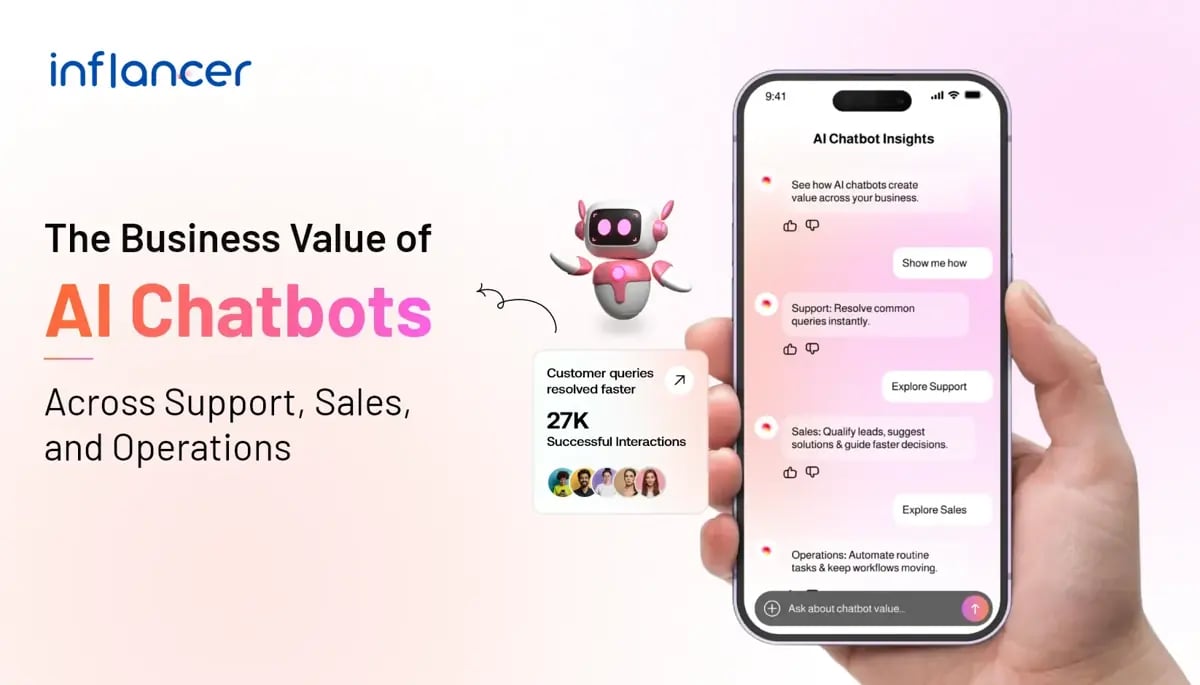
AI chatbots help businesses automate customer support, qualify leads, process transactions, schedule tasks, and streamline internal operations. This helps in reducing response times, cutting operational costs, and enabling 24/7 service without proportional headcount growth.
Businesses are under pressure to scale customer engagement, sales, and operations without proportionally increasing headcount. AI chatbots have become the operational answer, cutting response times by up to 80% and reducing support costs by 30% or more, according to IBM and Zendesk benchmark data.
But deployment alone doesn’t guarantee results. The difference between a chatbot that drives ROI and one that frustrates customers often comes down to integration depth.
“Every business we work with wants the same thing, to handle more customer interactions without hiring more people. The ones that struggle aren’t using the wrong AI. They launch the bot without connecting it to their CRM, their ticketing system, their live inventory. It can talk, but it can’t actually resolve anything. That’s where the ROI disappears.” – Shreytam Goyal, Generative AI Developer at Inflancer, with 75+ enterprise chatbot builds.
From retail and fintech to healthcare and SaaS, companies are deploying AI chatbots not just to answer FAQs, but to run entire workflows. A single bot today can resolve a customer complaint, pre-qualify a sales prospect, trigger a backend process, and escalate complex issues to a human agent, all within the same conversation thread.
This guide breaks down the most impactful AI chatbot use cases in 2026 across three core business functions: customer support, sales and lead generation, and internal operations with real-world applications, the underlying AI approach (LLM-based, rule-based, or hybrid), and measurable outcomes for each.
Whether you’re evaluating your first chatbot deployment or auditing an existing one for ROI, this resource gives you implementation clarity snot just a surface-level feature list.
In a Nutshell
- AI chatbots resolve up to 80% of routine customer queries without human involvement. Thus, freeing support agents for complex, high-value interactions.
- Businesses deploying conversational AI report 25–40% increases in qualified lead conversion primarily by replacing static web forms with real-time conversational qualification.
- Enterprise chatbot ROI typically turns positive within 6–12 months; faster for customer support automation, slower for complex multi-system operational deployments.
- The most effective AI chatbot implementations combine NLP with live CRM and ERP integration. A chatbot without access to real data gives generic answers that frustrate users.
- AI chatbot development costs range from $5,000 for a basic rule-based bot to $250,000+ for a custom enterprise-grade conversational AI platform. Post-launch retraining is the most commonly underestimated cost.
- The best chatbot strategy is hybrid: AI handles first contact and routine resolution, human agents handle complexity and emotional nuance. Companies using this model report 45% lower cost-per-interaction than pure live chat.
What Can AI Chatbots Do for Businesses?
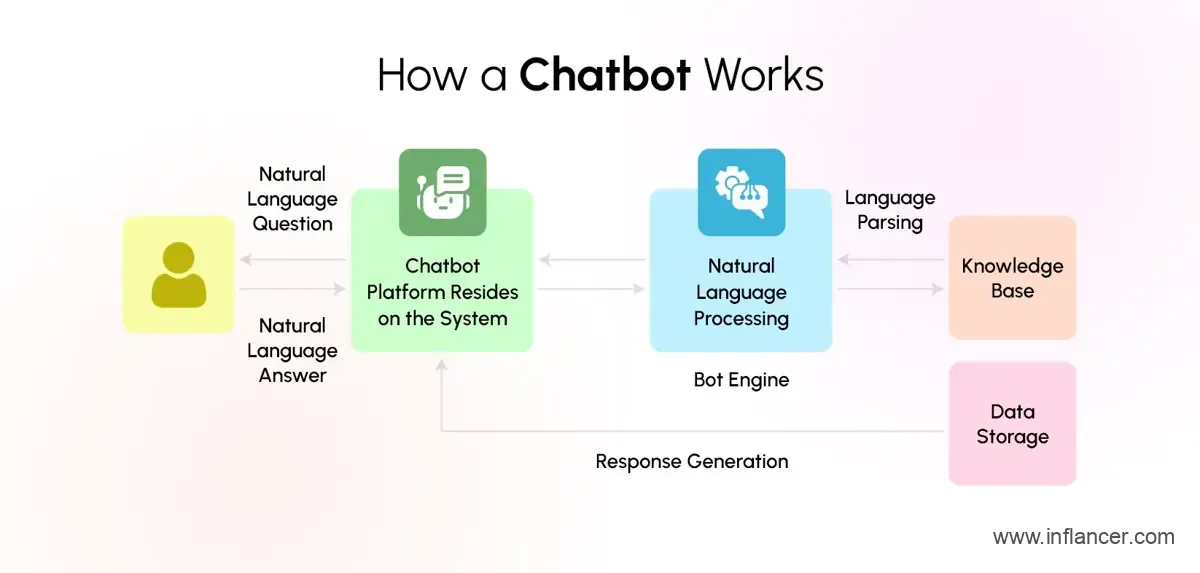
AI chatbots for business go far beyond answering FAQs. Modern conversational AI solutions handle complex, multi-turn conversations understanding intent, pulling real-time data from integrated systems, personalizing responses, and escalating to humans when needed. The core capabilities fall into three strategic areas: customer support automation, sales acceleration, and operational efficiency.
Salesforce reported in 2025 that AI was already resolving 30% of customer service cases, with service teams expecting this figure to reach 50% by 2027.
With 77% of customers expecting an immediate response when contacting a company, AI chatbots can help businesses provide always-available assistance, answer routine questions, manage high conversation volumes, and escalate complex issues to human agents.
Also Read: Chatbots vs. Conversational AI: Which Is Right for Your Business?
Let Your Chatbot Handle the Questions Your Team Gets Daily
Automate routine conversations so your support team can focus on customers who need real attention.
AI Chatbot Use Cases in Customer Support
AI customer support automation is the highest-ROI application of chatbot technology for most businesses, delivering faster resolution, 24/7 availability, and significant cost reduction compared to traditional support models. For businesses looking to extend these capabilities, customer support chat software can provide real-time assistance, streamline customer conversations, and help support teams respond more quickly across different channels.
1. Instant Query Resolution
NLP chatbot solutions can now resolve Tier 1 and Tier 2 support tickets with no human involvement. These include password resets, order tracking, refund status, billing inquiries, product troubleshooting, and appointment scheduling. IBM estimates that AI chatbots resolve 80% of routine customer questions automatically, freeing support agents for complex, high-value interactions.
2. Multilingual Support at Scale
AI virtual assistants for business can support customers in 50+ languages simultaneously, helping companies deliver consistent assistance across global markets without significantly increasing staffing costs. When integrated with customer support chat software, a mid-market e-commerce brand can manage customer interactions across English, Hindi, Arabic, and Spanish while maintaining faster response times and reducing the need for additional support staff.
3. Intelligent Ticket Routing
When a query exceeds the chatbot’s capability, AI triage systems route the ticket to the correct department with a full conversation summary pre-attached. This eliminates the frustrating “please repeat your issue” experience and reduces average handle time by 35%, according to Zendesk benchmark data.
4. Proactive Support Outreach
Unlike traditional reactive support, AI chatbots can initiate conversations alerting customers about delayed shipments, upcoming renewals, or account anomalies before the customer even notices. This proactive engagement model improves CSAT scores by an average of 20 points, based on data from Intercom’s 2024 Customer Success Report.
When combined with personalization and human handoff, these capabilities show how AI chatbots improve customer experience across different touchpoints.
A Single Chatbot Did the Work of 700 Employees – Here’s the Data
Klarna deployed an OpenAI-powered AI chatbot across its customer service operation. The chatbot handled two-thirds of all customer service chats over 2.3 million cases per month while reducing average handling time from 12 minutes to under two, maintaining customer satisfaction scores equivalent to human agents.
Klarna reported the AI slashed support costs by 40% and attributed an estimated $40 million profit improvement to the deployment. It remains the most documented enterprise chatbot ROI case study to date.
Source: Klarna
AI Chatbot Use Cases in Sales
AI chatbots for sales are proven to increase conversion rates, shorten sales cycles, and qualify leads at a volume no human SDR team can match. Businesses using conversational AI in their sales funnel report 25–40% improvement in lead-to-opportunity conversion.
1. Lead Qualification and Scoring
Conversational AI solutions replace static web forms with dynamic conversations that qualify prospects in real time. Instead of filling out a 10-field form, a visitor answers 3–4 natural questions and the chatbot scores them against your ICP, enriches the record in your CRM, and either books a meeting or hands off to sales with full context.
A SaaS company using this approach with HubSpot integration reported a 38% increase in MQL-to-SQL conversion within 90 days of deployment purely by replacing their contact form with a conversational qualifier.
2. 24/7 Demo and Product Discovery
Enterprise chatbot development teams consistently report that a significant percentage of high-intent website visits happen outside business hours on weekdays between 8–11 PM and on weekends. This highlights why chatbot enterprise use cases are becoming increasingly important for businesses looking to engage prospects around the clock. An AI chatbot can walk a prospect through a product demo, answer detailed pricing and feature questions, and book a discovery call for the next business day, capturing leads that would otherwise bounce.
3. Cart Abandonment Recovery
In e-commerce, AI chatbots integrated with cart systems can trigger personalized re-engagement messages when a user abandons a session. These messages can include the specific items left behind, a personalized discount offer, or answers to any product questions the user viewed, recovering 10–15% of abandoned carts on average, according to Klaviyo’s 2024 E-commerce Benchmarks report. This demonstrates the business case for chatbots, helping businesses increase conversions, reduce cart abandonment, and deliver more personalized shopping experiences.
4. Upsell and Cross-Sell Automation
Post-purchase chatbot interactions can recommend complementary products based on purchase history and browsing behavior. Unlike static “customers also bought” widgets, conversational AI engages the customer in a dialogue: “You just bought X many customers pair it with Y because of Z.” This dynamic upsell approach drives 12–18% higher average order value in retail deployments.
These capabilities are part of a broader set of AI chatbot applications in e-commerce, including product discovery, cart assistance, order updates, returns, and personalized shopping support.
AI Chatbot Use Cases in Operations
Beyond customer-facing functions, AI-powered chatbot automation services are transforming how businesses run internal operations from HR and IT helpdesks to supply chain management and financial processing.
1. HR and Employee Self-Service
AI virtual assistants services for business handle the most time-consuming HR queries: leave balance inquiries, payroll questions, benefits enrollment, onboarding checklists, and policy lookups. Deloitte data shows that HR departments using chatbot automation reduce administrative overhead by 40%, allowing HR teams to focus on talent strategy and culture.
A global manufacturing firm with 12,000 employees deployed an internal HR chatbot and reduced HR support tickets by 60% in the first quarter equivalent to 3 full-time positions reallocated to strategic work.
2. IT Helpdesk Automation
IT support is one of the most mature enterprise chatbot use cases. NLP chatbot solutions handle password resets, software access requests, VPN troubleshooting, and device provisioning the tasks that consume 60–70% of IT helpdesk bandwidth. ServiceNow reports that enterprises using AI-powered IT chatbots reduce mean-time-to-resolution (MTTR) from 4 hours to under 20 minutes for common issues.
3. Supply Chain and Vendor Communication
AI chatbots integrated with ERP systems can communicate order status, flag delivery exceptions, process vendor queries, and trigger reorder workflows without manual intervention. A logistics company using chatbot automation in its vendor portal reduced manual procurement emails by 55% and cut purchase order processing time from 3 days to 4 hours.
4. Financial Operations and Reporting
Finance teams use conversational AI to query live financial data, generate on-demand reports, process expense approvals, and flag anomalies in spending patterns. A mid-size fintech firm reported a 70% reduction in time-to-report for monthly financial summaries after integrating a GPT-4-powered chatbot with its data warehouse.
Related reading: 10 Compelling Reasons Why Your Business Needs an AI Chatbot
Which Industries Benefit Most from AI Chatbots?
Industries with high conversation volumes, repetitive customer requests, structured workflows, and strong digital infrastructure generally benefit most from AI chatbots. The value depends less on the industry itself and more on whether the chatbot can access accurate information, connect with business systems, and complete useful actions.
IBM reports that conversational AI can reduce the average cost of handling each customer query by 23.5%. However, actual savings may vary depending on the chatbot’s quality, integrations, usage volume, and business requirements.
| Industry | Common AI Chatbot Use Cases | Potential Business Value |
|---|---|---|
| E-commerce and Retail | Product discovery, order tracking, returns, cart assistance and customer FAQs | Faster purchasing support and fewer repetitive service requests |
| Banking and Financial Services | Account enquiries, application guidance, document collection and fraud-alert routing | Faster routine assistance with human escalation for regulated decisions |
| Healthcare | Appointment scheduling, reminders, patient onboarding and general service navigation | Reduced administrative workload and more convenient patient access |
| SaaS and Technology | Product onboarding, account support, troubleshooting and feature guidance | Faster user assistance and improved access to product information |
| Real Estate | Lead qualification, property enquiries, viewing requests and follow-ups | Faster lead response and more consistent prospect screening |
| Education | Admissions support, course guidance, fee enquiries and student-service FAQs | Lower administrative pressure during high-volume enquiry periods |
| Travel and Hospitality | Booking assistance, itinerary information, reservation changes and service requests | Round-the-clock assistance across common stages of the customer journey |
AI chatbots tend to produce the greatest value when requests are frequent, predictable and connected to clear business processes. Their suitability is lower when conversations require emotional sensitivity, complex negotiation, professional judgement or decisions carrying significant legal assistant, medical or financial risk.
How Much Does AI Chatbot Development Cost?
AI chatbot development typically costs $5,000 to $250,000 or more, depending on the chatbot’s complexity, AI capabilities, integrations, deployment model and security requirements. A basic chatbot with predefined flows may sit at the lower end, while an enterprise conversational AI platform with CRM, ERP, multilingual and compliance integrations can require a six-figure budget.
Estimated AI Chatbot Development Cost by Type
| Chatbot Type | Typical Scope | Illustrative Cost Range |
|---|---|---|
| Basic Rule-Based Chatbot | Predefined questions, simple conversation flows, website deployment and limited integrations | $5,000–$15,000 |
| AI-Powered FAQ Chatbot | Natural-language queries, knowledge-base search, analytics and basic human handoff | $15,000–$40,000 |
| Mid-Market NLP Chatbot | Custom workflows, CRM integration, multiple channels and user authentication | $40,000–$80,000 |
| Generative AI Chatbot | LLM integration, retrieval-augmented generation, document search, guardrails and monitoring | $60,000–$150,000 |
| Enterprise Conversational AI Platform | Deep CRM or ERP integration, multilingual support, advanced security, analytics and high-volume deployment | $100,000–$250,000+ |
| Ongoing Support and Optimization | Monitoring, knowledge updates, testing, model evaluation and workflow improvements | Usually quoted separately |
These ranges are planning estimates rather than standardized industry prices. The final AI chatbot development cost depends on the project scope, development location, technology stack, system architecture, and third-party usage charges. Every business has unique requirements, so the overall investment may vary based on the complexity of features and integration needs.
What Factors Affect AI Chatbot Development Cost?
The largest cost drivers include:
- Number and complexity of conversation flows
- Quantity and quality of knowledge sources
- CRM, ERP, payment and ticketing integrations
- Website, mobile, WhatsApp, voice or other channels
- Text, voice and multilingual capabilities
- User authentication and personalization
- Human-agent handoff requirements
- Reporting and analytics
- Cloud, private-cloud or on-premises deployment
- Security, compliance and data-governance requirements
What Additional Chatbot Costs Should Businesses Consider?
The initial development budget is only one part of the total cost. Businesses may also need to pay for:
| Additional Cost | What It Covers |
|---|---|
| AI Model Usage | Input and output tokens, model requests or generated responses |
| Conversation Platform Fees | Per-request, per-session or monthly platform charges |
| Cloud Infrastructure | Hosting, storage, databases, monitoring and data transfer |
| Third-Party Integrations | CRM, messaging, payment, voice or analytics services |
| Maintenance and Optimization | Failed-query analysis, knowledge updates, testing and prompt refinement |
| Security and Compliance | Audits, access controls, encryption, data residency and penetration testing |
Businesses planning complex integrations, multilingual support, and enterprise security can work with an AI chatbot development company to define the right architecture and implementation approach.
Are AI Chatbots Better Than Live Chat?
AI chatbots are not universally better than human-assisted live chat. Chatbots are more suitable for repetitive, high-volume and time-sensitive requests, while human agents remain better suited to ambiguous, emotionally sensitive, negotiable or high-risk conversations.
| Capability | AI Chatbot | Human-Assisted Live Chat |
|---|---|---|
| Availability | Can operate continuously when systems are available | Depends on staffing hours and agent availability |
| Conversation volume | Can manage many concurrent conversations within platform and infrastructure limits | Limited by the number of available agents |
| Response consistency | Delivers standardized answers from approved data sources | May vary according to agent knowledge and interpretation |
| Routine automation | Can complete defined tasks through connected systems | Often requires agents to perform tasks manually |
| Empathy and judgement | Limited and dependent on model design and safeguards | Better suited to emotional, sensitive and unfamiliar situations |
| Negotiation | Suitable only for controlled and predefined scenarios | Better for flexible offers, exceptions and complex discussions |
| High-risk decisions | Should escalate rather than act independently | Can involve trained and authorized personnel |
The most effective approach is usually a hybrid chatbot and live-chat model. The chatbot identifies the customer’s intent, answers routine questions, collects relevant information and completes low-risk actions. Platforms like SleekFlow demonstrate how AI-powered support can work alongside human agents to manage customer interactions. The chatbot then transfers the conversation to a human agent when the request exceeds its knowledge, permissions or confidence threshold.
IBM states that conversational AI can help contact centres offload simple enquiries and provide real-time support around the clock.
The technology should therefore be positioned as a way to extend human support capacity, not as a complete replacement for trained agents.
How Do AI Chatbots Integrate with CRM Systems?
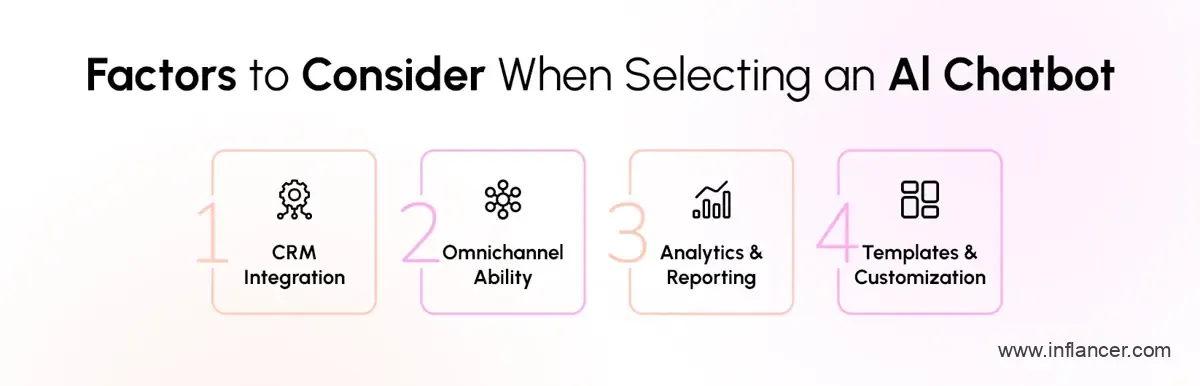
AI chatbots can integrate with CRM platforms such as Salesforce, HubSpot, Zoho CRM, Microsoft Dynamics 365 and Pipedrive through native connectors, middleware, webhooks or custom APIs. The exact integration method depends on the chatbot platform, CRM permissions and available APIs.
A chatbot with authenticated, bidirectional CRM access can:
- Create new contact or lead records during a conversation
- Update approved customer fields with newly collected information
- Retrieve previous interactions, purchases or support history
- Log conversation transcripts, customer intent and resolution status
- Assign follow-up tasks to sales or support representatives
- Update lead stages or customer-service ticket statuses
- Trigger approved CRM workflows and nurture sequences
- Pass qualified enquiries to the correct team or representative
Did You Know?
HubSpot, for example, supports rule-based chatbots, live-chat flows and AI customer-service workflows connected with CRM data.
Source: Hubspot
The most important requirement is controlled bidirectional data exchange. Reading CRM data allows the chatbot to provide contextual responses, while writing approved information back to the CRM enables workflow automation. A one-way integration that only sends transcripts to a representative provides documentation but delivers limited process automation.
CRM-connected chatbots should also implement:
- Role-based access controls
- Authenticated and encrypted API communication
- Customer consent where required
- Restrictions on readable and editable fields
- Data-retention rules
- Audit logs for chatbot actions
- Human approval for sensitive changes
- Compliance controls appropriate to the industry and location
A chatbot should receive only the minimum access required to perform its approved tasks. It should not have unrestricted access to every customer record or CRM function.
Turn More Website Conversations into Qualified Sales Opportunities
Engage visitors instantly, understand what they need, and guide them toward the right next step.
How to Automate Operations with AI Chatbots?
Businesses can automate operations with AI chatbots by identifying repetitive requests, mapping the required workflows, selecting suitable conversational technology, connecting the chatbot with business systems, and measuring its performance after launch. The best starting point is a high-volume, low-risk process with clear rules and a measurable outcome.
Step 1: Identify Repetitive, High-Volume Requests
Review customer-support tickets, sales enquiries, HR requests and internal service records to identify tasks that occur frequently and follow predictable patterns.
Good initial automation candidates may include:
- Order and delivery updates
- Appointment scheduling
- Password-reset guidance
- Lead qualification
- Product or service FAQs
- Leave-policy questions
- Support-ticket creation
- Account-status enquiries
Prioritize tasks that are repetitive, time-consuming and safe for the chatbot to handle. Sensitive, ambiguous or high-risk decisions should remain with qualified employees.
Step 2: Map the Conversation and Escalation Paths
Document how each conversation should begin, what information the chatbot must collect, which systems it needs to access and when it must transfer the user to a human agent.
The conversation map should cover:
- Common user intents
- Required questions and responses
- Authentication requirements
- Missing or unclear information
- Failed searches and unsupported requests
- Error handling
- Human-escalation conditions
- Successful completion criteria
Mapping these paths before development reduces gaps that could leave users stuck or send them through irrelevant responses.
Step 3: Select the Right Conversational AI Technology
Choose the technology according to the complexity, deployment requirements and level of control needed.
- Large language models can support flexible, open-ended conversations and document-based question answering.
- Dialogflow CX is designed for structured, multi-step conversational flows and supports integrations with external systems.
- Rasa supports customizable deployment, including deployment within an organization’s own infrastructure or on-premises environment.
- Rule-based platforms may be sufficient for simple workflows with a limited number of predefined questions.
The selection should also consider data privacy, model accuracy, hosting, vendor costs, language support, maintenance and available technical expertise.
Businesses handling appointment bookings, customer calls, lead follow-ups, or phone-based support can also explore AI voice bots for conversational automation across inbound and outbound calls.
Step 4: Connect the Chatbot with Business Systems
Integrate the chatbot with the systems required to complete the selected workflow, such as:
- CRM platforms
- ERP systems
- Inventory databases
- Scheduling tools
- Help-desk software
- Payment services
- Identity and authentication systems
- Internal knowledge bases
For example, an order-support chatbot needs current order and delivery data. Without that connection, it can only give general instructions rather than resolve the customer’s request.
Use controlled two-way data sharing so the chatbot can read relevant information and write back only approved updates. Access should be limited through authentication, permissions, encryption and audit logs.
Step 5: Test the Chatbot Before Full Deployment
Test the chatbot with real-world language, incomplete questions, spelling variations, unexpected requests and integration failures.
Testing should evaluate:
- Answer accuracy
- Workflow completion
- System-response times
- Authentication
- Data permissions
- Human handoff
- Error recovery
- Security
- Performance under expected traffic
Begin with a limited pilot before expanding the chatbot across more users, channels or workflows.
Step 6: Measure and Improve Performance
Track a defined set of KPIs after launch. Useful chatbot metrics include:
- Containment rate: Percentage of interactions completed without human support
- Resolution rate: Percentage of requests successfully resolved
- Escalation rate: Percentage transferred to human agents
- Customer satisfaction: User feedback after the interaction
- Average resolution time: Time taken to complete a request
- Fallback rate: Frequency of unanswered or misunderstood requests
- Cost per interaction: Total operating cost divided by interaction volume
- Task-completion rate: Percentage of users who complete the intended workflow
Google identifies containment, customer satisfaction and operational efficiency measures as relevant indicators for evaluating generative AI and contact-centre performance.
Review failed conversations and unnecessary escalations regularly. The appropriate review frequency may be daily, weekly or monthly, depending on traffic volume, business risk and how often the underlying information changes.
Step 7: Expand Automation Gradually
Once the first workflow performs reliably, extend the chatbot to additional use cases or channels. Avoid automating several complex processes at once because this makes errors harder to identify and correct.
A practical sequence is:
- Automate one repetitive workflow.
- Test it with a limited user group.
- Measure accuracy and completion.
- Correct weak responses and integration issues.
- Expand to the next suitable workflow.
This staged approach helps businesses improve operations without giving the chatbot excessive access or responsibility too early.
Which Chatbot Platform Is Best for Enterprises?
The best enterprise chatbot platform depends on the company’s existing technology stack, integration requirements, security policies and conversational complexity. Salesforce Agentforce is often suitable for Salesforce-based organizations, Microsoft Copilot Studio fits Microsoft environments, Dialogflow CX supports complex conversational workflows, and IBM Watsonx Assistant offers flexible deployment options. Enterprises with proprietary workflows or highly specific data requirements may need a custom LLM-based chatbot solutions instead of an off-the-shelf platform.
Enterprise Chatbot Platforms Compared
| Platform | Best Suited For | Key Strengths | Important Considerations |
|---|---|---|---|
| Salesforce Einstein Bots and Agentforce | Organizations already using Salesforce Service Cloud and CRM | Native Salesforce data access, workflow automation, customer-service capabilities and CRM integrations | Most valuable within the Salesforce ecosystem and may require Salesforce-specific expertise |
| Microsoft Copilot Studio | Enterprises using Microsoft 365, Dynamics 365, Azure and Power Platform | Low-code development, Microsoft connectors, governance controls and enterprise access management | Licensing, data permissions and connector availability should be reviewed before implementation |
| Google Dialogflow CX | Businesses requiring complex, multi-step text or voice conversations | Flow-based conversation control, multilingual support, voice capabilities, APIs and testing tools | Advanced implementations generally require development and conversation-design expertise |
| IBM watsonx Assistant | Organizations requiring cloud, hybrid or on-premises deployment | Enterprise integrations, human handoff, security controls and flexible deployment options | Compliance depends on the organization’s configuration, infrastructure and governance controls |
| Custom LLM-Based Chatbot | Enterprises with proprietary data, unique workflows or specialized integration needs | Custom retrieval, tailored guardrails, architectural flexibility and workflow-specific automation | Requires greater development effort, testing, monitoring, security engineering and maintenance |
| Managed Customer-Service Platform | Mid-market businesses with standard support and service workflows | Faster deployment, pre-built help-desk integrations, analytics and human-agent handoff | Provides less flexibility and customization than a fully custom chatbot architecture |
How Should an Enterprise Choose a Chatbot Platform?
Enterprises should compare chatbot platforms based on:
- Compatibility with existing CRM, ERP, help-desk and cloud systems
- Support for web, mobile, voice and messaging channels
- Data residency and deployment requirements
- Authentication, permissions, audit logs and governance controls
- Multilingual and multi-step conversation capabilities
- Human-agent escalation and conversation handoff
- API access and integration flexibility
- Model monitoring, testing and performance analytics
- Licensing and usage-based operating costs
- Availability of internal development and support expertise
There is no single chatbot platform that is best for every enterprise. The right choice is the platform that fits the organization’s existing systems, required workflows, data policies, deployment model and long-term operating capacity.
How Can Inflancer Support AI Chatbot Development?
Inflancer supports AI chatbot development by creating conversational solutions that automate customer support, sales, and internal operations. The process starts with identifying high-volume use cases, mapping user journeys, and connecting the chatbot with relevant business systems.
Key capabilities include:
- Custom AI and NLP chatbot development
- CRM, ERP, help desk, and knowledge-base integration
- Generative AI and RAG-based information retrieval
- Website, mobile, messaging, and voice deployment
- Multilingual support and human-agent handoff
- Testing, analytics, security, and ongoing optimization
The final solution is aligned with business goals, data permissions, workflow complexity, and measurable KPIs. This enables organizations to automate routine conversations while maintaining response accuracy, operational control, data security, and consistent customer experiences across different communication channels.
Final Takeaway
AI chatbots are no longer an optional add-on they are the operating standard for businesses competing on customer experience and operational efficiency. The companies winning in 2025 are those that have moved past basic FAQ bots and deployed conversational AI solutions that are deeply integrated with their CRM, ERP, and support systems, fueled by proprietary data, and continuously optimized based on real conversation analytics.
Whether you’re starting with a customer support automation pilot or planning a full enterprise chatbot development program, the strategic framework is the same: audit your highest-volume interactions, pick the right NLP engine for your complexity level, integrate deeply with your existing data sources on day one, and measure relentlessly.
The businesses that do this consistently report not just cost savings, but a fundamental shift in how they scale growing customer touchpoints without proportional headcount growth.
Build a Chatbot That Actually Helps Customers Get Things Done
Move beyond basic replies with connected conversations that complete tasks and reduce unnecessary back-and-forth delays.
Frequently Asked Questions
Get the weekly updates on the newest brand stories, business models and technology right in your inbox.