Just Bang on! Here’s the big day for Android Programmers. Google announces the availability of the latest version of its flagship IDE for mobile, Android Studio 3.0, while also launching a developer preview of Android 8.1 (Oreo). Yes, Android Studio 3.0 is ready to download today. Formerly announced at Google I/O 2017, Android Studio 3.0 is a huge update focused on accelerating your Android app development. Here’s a blog post by Inflancer to show off the various nuances of the new interface concerning the development experience.
Java 8 Language features
Android Studio provides built-in support for using certain Java 8 language features and third-party libraries that use them. See here:
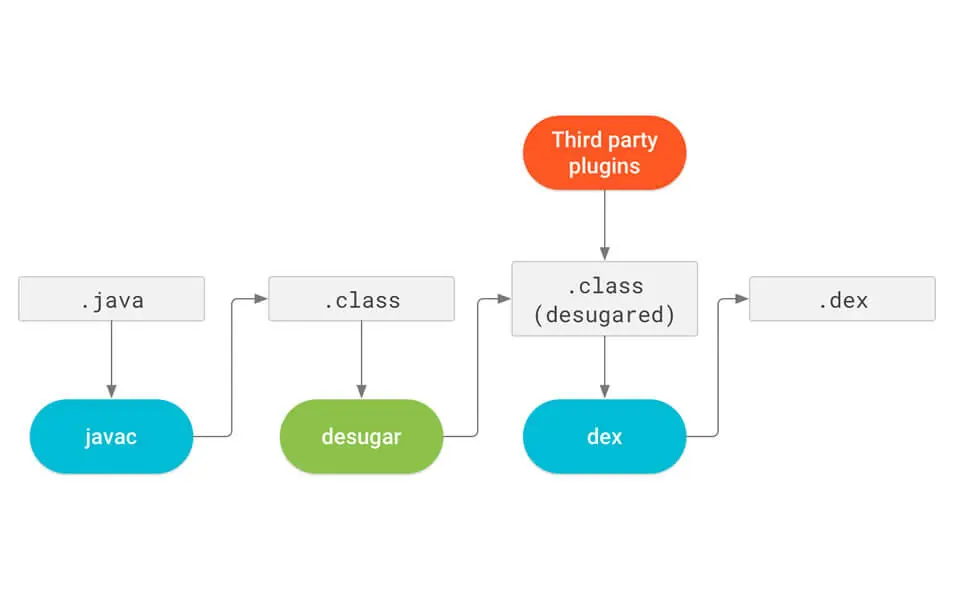
With the migration to a java based toolchain, using Java 8 language features in your project becomes way easier. To update your project to support the new Java 8 Language toolchain, simply update your Source and Target compatibility levels to 1.8 in the Project Structure dialog. Learn More.
Kotlin Support
The Kotlin programming language now officially supports Android. So with the new release, as announced in Google I/O 2017, Android Studio includes Kotlin language support for Android development. Incorporate Kotlin into your project by converting a Java file to Kotlin (click Code > Convert Java File to Kotlin File) or by creating a new Kotlin- enabled project using the New Project wizard. Read how to add kotlin to your project.
Layout Editor
The component tree in the Layout Editor has with better drag-and-drop view insertions, a new error panel, and new toolbar layout and icons.
Android Profiler
Measure your app’s CPU, memory, and network usage in real time as the new Android Profiler replaces the Android Monitor tool.
XML Fonts & Downloadable Fonts
If you target Android Oreo (API Level 26 and higher) for your Android app, you can now add custom fonts & downloadable fonts using XML with Android Studio 3.0.
Android Things Support
Android Studio 3.0 includes a new set of templates in the New Project wizard and the New Module wizard to develop for the Android Things platform.
APK Profiling and Debugging
Android Studio now allows you to profile and debug any APK without having to build it from an Android Studio project, as long as the APK is built to enable debugging and you have access to the debug symbols and source files, especially when working with apps compatible with the Android 7.0 update. To learn more see Profile and Debug Pre-built APKs.
Instant Apps support
New support for Android Instant Apps gives you the ability to create Instant Apps in your project using two new module types: Instant App modules and Feature modules (these require that you install the Instant Apps Development SDK), making it easier to leverage Android Oreo features for faster, seamless user experiences without full app installation.
Adaptive Icons Wizard
Image Asset Studio now supports vector drawables, helping developers create scalable, high-quality graphics. It also enables adaptive launcher icons for Android 8.0 along with legacy icons for older devices, aligning with key Android P features for better UI consistency.
Layout Inspector
Debugging app layouts is now faster and more intuitive with the enhanced Layout Inspector. The latest update introduces smarter grouping of related properties and an improved search function within both the View Tree and Properties Pane. These updates empower every Android app developer to identify and fix UI issues efficiently, streamlining the entire app optimization process.
Get the weekly updates on the newest brand stories, business models and technology right in your inbox.