The world of app/web designing is concerned with creating a lasting impact on users by integrating creative ideas and design elements. Even though, designers hold a good command over the design practices but deep down there is a need to put down some extra effort that corners their business in the market. The major concern in the design aspect will include factors required to create a new experience, and robust strategies that separate good products from terrible ones.
Therefore, to showcase how design principles help designers play a heroic role, we are listing down the top principles here.
Read on!
Which fundamentals of UX design should all designers must follow?
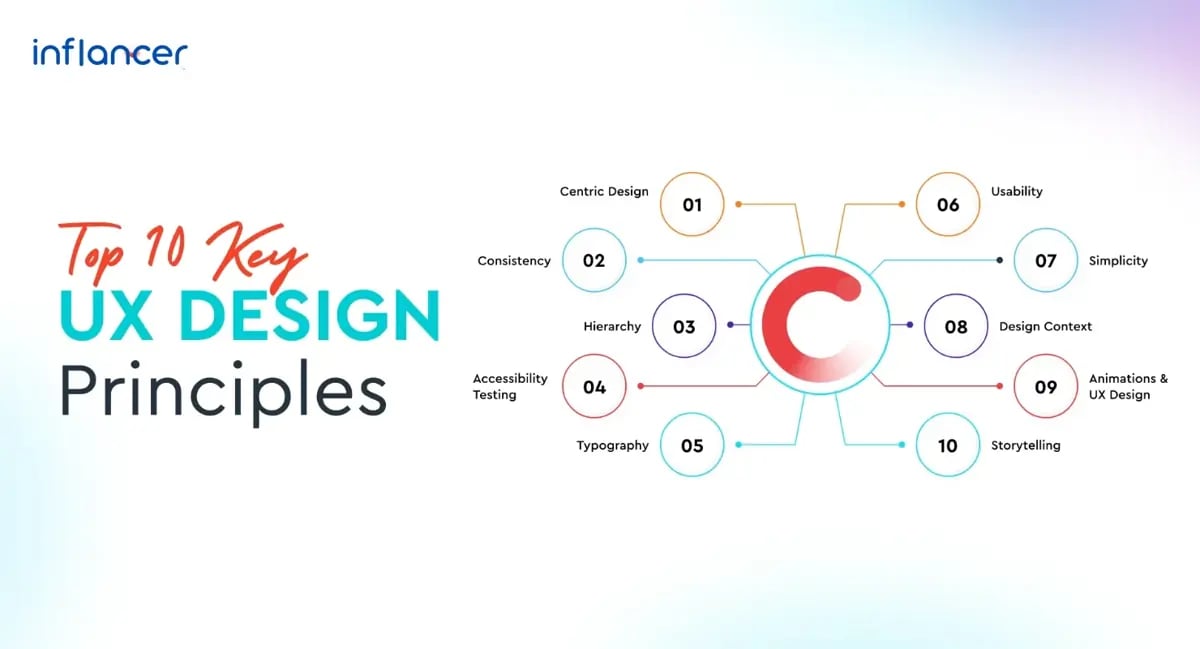
To ensure a lasting impact, follow these UX design principles: Create a user-centric design, maintain consistency, establish a clear hierarchy, perform accessibility testing, choose typography wisely, prioritize usability, embrace simplicity, understand the design context, incorporate animations, and leverage the power of storytelling. These principles enhance user experience, empower users, and contribute to a memorable and effective design.
The 10 Most Important UX Design Principles That Every Designer Must Follow:
1. Create User Centric Design
It is one of the crucial principles in UX design to create a design flow that satisfies user needs and offers them the elements they are looking for. User needs are focused closely because the user experience is what matters in the success of any web design.
Designers have their understanding and standards of delivering the best design, however, when their decisions are based on user information and other specific requirements, they are always the smart ones.
For instance, a creative design with a complex user journey can cost you a lot as you may immediately lose your user. Therefore, it is advisable to include intuitive elements that help your user to complete their purchase journey. Try out multivariate web designs to collect feedback and create one that matches your user preferences.
2. Maintain Consistency
Consistency in the UX design stands for creating a product design that is easy to use i.e. where the user can follow a low learning curve. Try to include intuitive fundamentals similar to other products in the market as it will accelerate user adaptability and enhance user experience.
The major aim of using this principle is to observe user behavior and offer them the convenience of using the product in a limited timeframe.
In other words, consistency can be maintained by focusing on the basic components like the right selection of the icon’s color, size, location, and arrangement that eliminates the user’s struggle to understand and operate the product.
For example, while creating a design for a food ordering app, follow the design process similar to other apps in the market. However, ensure that you do not copy your competitor and conversely, you can save yourself by reinventing the whole wheel.
3. Keep A Clear Hierarchy
The design hierarchy explains how the designer has shaped the product in terms of easy user navigation. There are two types of hierarchy focused on the design part i.e. content hierarchy and visual hierarchy.
Managing content hierarchy means a consistent alignment of the different web pages and their content. Whereas, the visual hierarchy represents the presentation and arrangements of the design elements on the web page.
A website hierarchy principle is also used for these reasons:
- It ensures easy navigation for the site visitors
- It allows search engine bots to easily crawl the webpage for indexing
- It simplifies the designer’s task of precisely understanding the website’s functioning
Thus, keeping a clear hierarchy is important as it helps draw user attention to the most important sections or pages of the website and provides useful insights to the users as per their requirements.
4. Use Accessibility Testing
The user accessibility principle has gained greater popularity in recent years. The principle is used to ensure designers that their design must be accessible to all people including the ones who are physically challenged.
And to match the accessibility level of the UX design, it is crucial to remove the design obstacles and create a trouble-free layout where users can easily understand and get clear outcomes.
The design components that need to be focused on by users are text readability, color visibility, and a sufficient level of color contrast.
For example, a designer can make use of different contrasting colors in the fonts and background as well. This will increase the readability of multiple users including those who are having dim light or the ones who are visually Impaired.
5. The Selection of Typography Matters
Typography holds the power to change the way any user interprets the message. It is essential to pay attention to the typography choices by designers as it helps them to either enhance or deteriorate the meaning of the content displayed on the webpage.
On the contrary, the right selection of typography fonts can help designers improve text readability, accessibility, usability, and user-friendliness.
6. Be Heedful of Usability
Usability is the structure of the website that explains how easily the user can interact with the design. The major areas that need to be focused on while ensuring the high usability of a UX design include efficiency, learnability, user satisfaction, error prevention, and memorability of the design. It is very important to make your design safe and easy to use.
For example, if you are designing a website or working on a corporate food ordering app development project, then you need to ensure that the design should not be challenging or cluttered to retain your users. This can be easily managed by ensuring the purposeful placement and design of the text, buttons, snippets, and other elements.
On the contrary, there is no specific design guide as it may vary with different products and brands. Therefore, it is recommended to take the usability test with multiple design elements like font, text, style, clarity, etc.
7. Simplicity Wins Always
Every designer aims at creating a unique design by integrating multiple unique features that help them stand out in the market which is good from the design aspect. But it is important to note that user satisfaction matters more than the design decoration and attractions. This goal is easily achievable by making clear bifurcation of the design elements.
For example, if you are designing a PDF website then the primary elements like upload, convert, edit, etc. should be highlighted first. Then the other features like adding comments and page numbers, crop options, etc. must be placed as secondary options.
Thus, clear bifurcation makes the design look simple and clean and ensures better site conversions.
8. Get a Clear Understanding of The Design Context
Context is directly related to the situation or circumstances where the design will be used and the number of factors that will affect the user experience. To manage the design context, the designer can focus on the devices used to use the product, the user’s location, their expected emotional state, their tasks and goals, technological limitations and capabilities, and many other environmental factors.
Once the context is clear, the designer can easily envision user behaviour and create an intuitive design strategy that boosts user experience to the next level.
9. Add Animations to Make More Appealing UX Design
The moving effects are eye-catching and create a deep visual understanding of any design and new to the latest design trends. Designers can not only grab the user’s attention but they can communicate the purpose and idea behind the website functionality quickly and sharply.
Furthermore, by using animations, designers can help the target audience remember even the minute details of a design, eliminate unnecessary visuals, and create a more engaging and cost-effective strategy. This design principle is particularly suitable for businesses looking to express their ideas, thoughts, and concepts more effectively. Many web design services Nottingham use subtle animations to enhance engagement while maintaining a smooth and user-friendly browsing experience.
10. Use the Art of Storytelling
Isn’t it amazing and easy to remember a conversation rather than reading the whole uninteresting text?
Visual storytelling in UX design has various uses beyond brand recognition. It can be utilized to make data easier to understand and include, such as using infographics to present complex information in a visually appealing and digestible format. So, visual storytelling can enhance user onboarding by guiding users through the product and improving its learnability.
The storytelling principle plays a similar role to the UX design principle. Storytelling can be used in UX design to effectively communicate with users by utilizing videos, text, imagery, and animations to make the whole screen talk to the user. This approach helps to engage users and create a more visually appealing and memorable experience.
So, try to create a narrative design and leave a lasting impact on the user’s mind. You can also enjoy other appealing benefits of the storytelling principle like broadcasting a new campaign, and creating better brand recognition and even users can enhance their learnability level along with better user onboarding.
Users prefer stories in UX design because storytelling works more effectively in engaging them. Stories have the power to evoke emotions and create a long-lasting impression on the user. By incorporating storytelling elements, UX designers can captivate users and make the experience more enjoyable and memorable.
Why is confirmation important in UX design?
Confirmation is a crucial aspect of UX design as it empowers users to rectify or cancel unintended actions and reconsider their choices. By providing confirmation screens or dialogs, users are given the opportunity to review and verify the accuracy of their inputs before proceeding further. This ensures that users have a chance to catch any potential errors or mistakes, ultimately enhancing their overall user experience.
An instance where confirmation plays a significant role is during the online shopping process. When making a purchase, an order confirmation screen allows users to thoroughly examine and validate their entire order details, such as the selected items, quantities, and shipping information, before finalizing the transaction. This step adds an extra layer of assurance, allowing users to double-check their choices and make adjustments if required. It helps prevent any potential dissatisfaction or frustration that may arise from inaccurate or unwanted purchases.
Confirmation in UX design serves as a means to instill confidence and trust in users. By explicitly confirming their actions, whether it be completing a form submission or deleting important data, users feel reassured that their intentions will be accurately executed. This fosters a sense of control and eliminates any potential anxiety or uncertainty that may arise when performing critical tasks within an application or website.
Subsequently, incorporating confirmation screens or dialogs into UX design is essential because it empowers users to verify their actions, correct any unintended mistakes, and instills confidence in their decision-making. It enables a more seamless and error-free user experience while establishing a foundation of trust between the user and the product or service.
What is user control and why is it important in UX design?
User control in UX refers to providing users with the ability to manage and direct their activities while utilizing a product or system. It is a fundamental aspect of UX design that focuses on empowering users and enhancing their overall experience.
One crucial element of user control is the ability for users to correct any errors they may make. For instance, when users are engaged in tasks such as creating an event or composing an email, it is vital to include a Cancel button that allows them to abandon the task if needed. Also, having an Undo button can provide users with the means to reverse any unintended actions they may have performed. These features not only restore a sense of control but also contribute to a smoother and more efficient user experience.
To further enhance user control, it is beneficial to cater to the needs of more advanced users. In this context, offering keyboard shortcuts can significantly boost their productivity, enabling them to navigate through the product or system swiftly. The integration of macros and templates can facilitate repetitive actions, allowing users to accomplish tasks more effectively and efficiently. By acknowledging the varying levels of user proficiency, UX design can empower users to have a greater sense of control over their interactions.
Another aspect of user control is providing users with the means to manipulate and manage their content. This can be achieved by incorporating features that enable users to move or organize their content within the product or across different platforms. By offering these capabilities, users can have a more personalized experience and tailor the product or system to suit their individual preferences.
So on, implementing advanced searching capabilities can significantly enhance user control. By making it easier for users to discover the information they are seeking, UX design can optimize the efficiency of their interactions. The ability to quickly and accurately locate desired content contributes to a more seamless and satisfying user experience.
Empowering users through control is at the heart of great UX design. When users can navigate, adjust settings, and interact with digital products according to their preferences, they feel more confident and satisfied. Features like error recovery, intuitive navigation, content customization, and advanced search options all contribute to a seamless experience. For businesses offering website development services in Maryland, prioritizing user control within every design decision ensures not only usability but also long-term engagement and trust. When users feel in command, they’re more likely to stay, explore, and convert.
Summing Up!
The world of app/web designing is concerned with creating a lasting impact on users by integrating creative ideas and design elements. Even though designers hold a good command over the design practices, it’s crucial to put in extra effort to stand out in the market. That’s where the importance of user experience (UX) design principles comes into play.
UX design focuses on understanding user requirements, their need for a product, and the limitations they may face. By considering these factors, designers can effectively create a new experience and develop robust strategies that separate good products from terrible ones. UX design principles act as a strong foundation for creating solutions that not only look visually appealing but also meet user needs effectively.
UI-UX development encompasses swift, strategic, and exciting actions to uplift the desired outcomes. The ultimate goal of a designer revolves around enhancing user experience, which can be easily achieved by incorporating UX design principles. These principles provide a framework for creating user-centric designs, utilizing new design patterns, and implementing evolving standards.
To ensure the success of your app or web development in Chicago, it is essential to embrace the required updates in your design strategies. By considering the above-mentioned cluster of top UX design principles, you can elevate your product to become a great hit in the market. So, make sure to integrate these principles into your design process and create an exceptional user experience for your target audience.
Hire Our UI/UX Designers to Create A Compelling User Experience That Aligns with Latest Design Principles.
Get the weekly updates on the newest brand stories, business models and technology right in your inbox.